Unlock a world of possibilities! Login now and discover the exclusive benefits awaiting you.

- Qlik Community
- :
- All Forums
- :
- QlikView
- :
- Re: VARIABLE WITH DYNAMIC NAME
- Subscribe to RSS Feed
- Mark Topic as New
- Mark Topic as Read
- Float this Topic for Current User
- Bookmark
- Subscribe
- Mute
- Printer Friendly Page

 souadouert
- Mark as New
- Bookmark
- Subscribe
- Mute
- Subscribe to RSS Feed
- Permalink
- Report Inappropriate Content
VARIABLE WITH DYNAMIC NAME
Hello i have this table
| ID_SALER | PRODUCT | CATEGORIE | sales | CLIENT_PRODUCT |
| 100 | P1 | c1 | 500 | 10 |
| 100 | P2 | c12 | 500 | 10 |
| 102 | P1 | c3 | 502 | 12 |
| 102 | P2 | c4 | 503 | 13 |
and i have variables $(P1) ET $( P2)
P1=sum({<CATEGORIE={'C1'},sales={'<700'}>}1)
P2=sum({<CATEGORIE={'C5'},sales={'<700 >200'}>}1)
SO I need to create simple table , in dimension ID_saler and Product
and in expression i need to add the variable with corresponding to value dimensions --> =$(PRODUCT)
| ID_SALER | PRODUCT | EXPRESSION | |
| 100 | P1 | $(PRODUCT) | $(P1) |
| 100 | P2 | $(PRODUCT) | $(P2) |
| 102 | P1 | $(PRODUCT) | $(P1) |
| 102 | P2 | $(PRODUCT) | $(P2) |
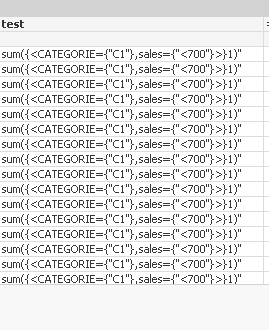
but iwhen i excuted , the expression shows the text expression
sum({<CATEGORIE={'C1'},sales={'<700'}>}1)
sum({<CATEGORIE={'C5'},sales={'<700 >200'}>}1)
So i need to force the interpretation
- Tags:
- qlikview_scripting
Accepted Solutions

 stigchel
- Mark as New
- Bookmark
- Subscribe
- Mute
- Subscribe to RSS Feed
- Permalink
- Report Inappropriate Content
The problem is that $ sign expansions are on a chart level and do not work with row by row dimension values. You probably need to use a pick match construction like =Pick(Match(Product,'P1','P2'),$(P1),$(P2)). To make this variable have a look at (and the links in there)

 YoussefBelloum
- Mark as New
- Bookmark
- Subscribe
- Mute
- Subscribe to RSS Feed
- Permalink
- Report Inappropriate Content
Hi,
what is the content of the variable $(PRODUCT) ?
you are using two variables in your expression ?
souadouert
- Mark as New
- Bookmark
- Subscribe
- Mute
- Subscribe to RSS Feed
- Permalink
- Report Inappropriate Content
Hello,
the idea is that the dynamic variable name according to the value of the dimension product
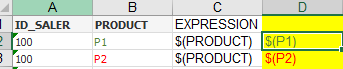
and P1 and P2
P1=sum({<CATEGORIE={'C1'},sales={'<700'}>}1)
P2=sum({<CATEGORIE={'C5'},sales={'<700 >200'}>}1)
YoussefBelloum
- Mark as New
- Bookmark
- Subscribe
- Mute
- Subscribe to RSS Feed
- Permalink
- Report Inappropriate Content
a simple IF won't do the trick ?
if(PRODUCT='P1', $(P1), $(P2))
souadouert
- Mark as New
- Bookmark
- Subscribe
- Mute
- Subscribe to RSS Feed
- Permalink
- Report Inappropriate Content
youssef I do not have the list of products,I must have as much product as dynamically variable
YoussefBelloum
- Mark as New
- Bookmark
- Subscribe
- Mute
- Subscribe to RSS Feed
- Permalink
- Report Inappropriate Content
take a look at this:
stigchel
- Mark as New
- Bookmark
- Subscribe
- Mute
- Subscribe to RSS Feed
- Permalink
- Report Inappropriate Content
The problem is that $ sign expansions are on a chart level and do not work with row by row dimension values. You probably need to use a pick match construction like =Pick(Match(Product,'P1','P2'),$(P1),$(P2)). To make this variable have a look at (and the links in there)
