Unlock a world of possibilities! Login now and discover the exclusive benefits awaiting you.

- Qlik Community
- :
- All Forums
- :
- QlikView
- :
- Value in block chart
Options
- Subscribe to RSS Feed
- Mark Topic as New
- Mark Topic as Read
- Float this Topic for Current User
- Bookmark
- Subscribe
- Mute
- Printer Friendly Page
Turn on suggestions
Auto-suggest helps you quickly narrow down your search results by suggesting possible matches as you type.
Showing results for

Not applicable
2015-02-24
02:48 AM
- Mark as New
- Bookmark
- Subscribe
- Mute
- Subscribe to RSS Feed
- Permalink
- Report Inappropriate Content
Value in block chart
Hi,
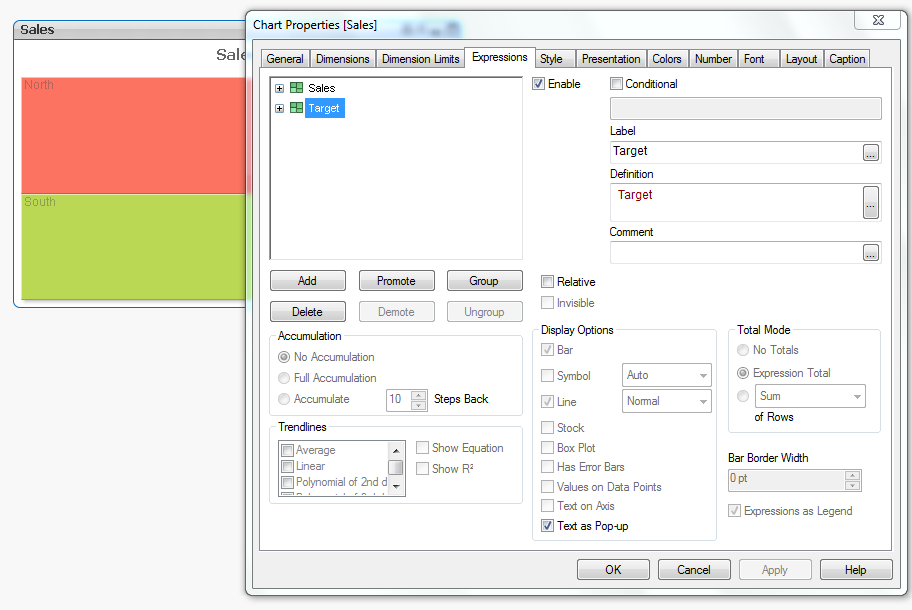
Please help me to show more than 1 value in block chart while hovering over the block.
As in attached app on hovering it's showing sales but I want to show target along with sales. I don't have Personal edition. Please post the solution.
Regards,
Navdeep
1,267 Views
1 Solution
Accepted Solutions

 kji
kji
Employee
2015-02-24
03:29 AM
- Mark as New
- Bookmark
- Subscribe
- Mute
- Subscribe to RSS Feed
- Permalink
- Report Inappropriate Content
Use a second expression with Text as Popup
1,140 Views
3 Replies
kji
Employee
2015-02-24
03:29 AM
- Mark as New
- Bookmark
- Subscribe
- Mute
- Subscribe to RSS Feed
- Permalink
- Report Inappropriate Content
Use a second expression with Text as Popup
1,141 Views
Anonymous
Not applicable
2015-02-24
03:55 AM
Author
- Mark as New
- Bookmark
- Subscribe
- Mute
- Subscribe to RSS Feed
- Permalink
- Report Inappropriate Content
You can a separate expression for Target and check the "Text as Pop-up" check box under Expression tab
Regards,
Laxmi
Not applicable
2015-02-24
03:55 AM
Author
- Mark as New
- Bookmark
- Subscribe
- Mute
- Subscribe to RSS Feed
- Permalink
- Report Inappropriate Content
Thanks Johan, exactly what I was looking for.
1,140 Views