Unlock a world of possibilities! Login now and discover the exclusive benefits awaiting you.

- Qlik Community
- :
- All Forums
- :
- QlikView
- :
- Re: Values only calculate the most recent date
- Subscribe to RSS Feed
- Mark Topic as New
- Mark Topic as Read
- Float this Topic for Current User
- Bookmark
- Subscribe
- Mute
- Printer Friendly Page

 neapicture
- Mark as New
- Bookmark
- Subscribe
- Mute
- Subscribe to RSS Feed
- Permalink
- Report Inappropriate Content
Values only calculate the most recent date
Hello
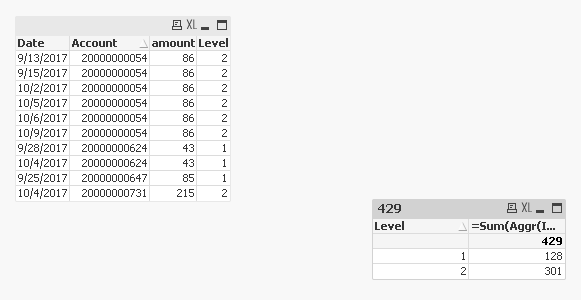
I would like to calculate a sum (Amount) and number per reminder level (Level) by customer (Account).
If the account occurs multiple times, only the amount of the most recent date of the record should be calculated.
The dimension should be the level.
I can not get any further here ...
Accepted Solutions

 sunny_talwar
- Mark as New
- Bookmark
- Subscribe
- Mute
- Subscribe to RSS Feed
- Permalink
- Report Inappropriate Content
Script
Table:
LOAD *,
If(Len(Trim(Storno)) > 0, 1, 0) as ExcludeFlag;
LOAD * INLINE [
Date, Account, amount, Level, Storno
9/13/2017, 20000000054, 86, 2
9/15/2017, 20000000054, 86, 2,
9/25/2017, 20000000647, 85, 1,
9/28/2017, 20000000624, 43, 1,
10/2/2017, 20000000054, 86, 2,
10/2/2017, 20000000054, 86, 2,
10/4/2017, 20000000731, 215, 2,
10/4/2017, 20000000624, 43, 1, x
10/5/2017, 20000000054, 86, 2
10/5/2017, 20000000054, 86, 2,
10/6/2017, 20000000054, 86, 2,
10/6/2017, 20000000054, 86, 2,
10/9/2017, 20000000054, 86, 2,
10/9/2017, 20000000054, 86, 2
];
Expression
=Sum({<ExcludeFlag = {0}>}Aggr(If(Only({<ExcludeFlag = {0}>}Date) = Max(TOTAL <Account> Date), Only({<ExcludeFlag = {0}>}amount)), Date, Level, Account))
sunny_talwar
- Mark as New
- Bookmark
- Subscribe
- Mute
- Subscribe to RSS Feed
- Permalink
- Report Inappropriate Content
May be this
=Sum(Aggr(If(Date = Max(TOTAL <Account> Date), amount), Date, Level, Account))
neapicture
- Mark as New
- Bookmark
- Subscribe
- Mute
- Subscribe to RSS Feed
- Permalink
- Report Inappropriate Content
A heartfelt thank you . It works. I have still one question. How does the formula change if the canceled values are not to be calculated? I forgot that. Sorry
sunny_talwar
- Mark as New
- Bookmark
- Subscribe
- Mute
- Subscribe to RSS Feed
- Permalink
- Report Inappropriate Content
Script
Table:
LOAD *,
If(Len(Trim(Storno)) > 0, 1, 0) as ExcludeFlag;
LOAD * INLINE [
Date, Account, amount, Level, Storno
9/13/2017, 20000000054, 86, 2
9/15/2017, 20000000054, 86, 2,
9/25/2017, 20000000647, 85, 1,
9/28/2017, 20000000624, 43, 1,
10/2/2017, 20000000054, 86, 2,
10/2/2017, 20000000054, 86, 2,
10/4/2017, 20000000731, 215, 2,
10/4/2017, 20000000624, 43, 1, x
10/5/2017, 20000000054, 86, 2
10/5/2017, 20000000054, 86, 2,
10/6/2017, 20000000054, 86, 2,
10/6/2017, 20000000054, 86, 2,
10/9/2017, 20000000054, 86, 2,
10/9/2017, 20000000054, 86, 2
];
Expression
=Sum({<ExcludeFlag = {0}>}Aggr(If(Only({<ExcludeFlag = {0}>}Date) = Max(TOTAL <Account> Date), Only({<ExcludeFlag = {0}>}amount)), Date, Level, Account))
