Unlock a world of possibilities! Login now and discover the exclusive benefits awaiting you.

- Qlik Community
- :
- All Forums
- :
- QlikView
- :
- Re: Variable for dynamic set analysis string does ...
- Subscribe to RSS Feed
- Mark Topic as New
- Mark Topic as Read
- Float this Topic for Current User
- Bookmark
- Subscribe
- Mute
- Printer Friendly Page

 baylor2016
- Mark as New
- Bookmark
- Subscribe
- Mute
- Subscribe to RSS Feed
- Permalink
- Report Inappropriate Content
Variable for dynamic set analysis string does not work.
Hi,
I am trying to use the dynamic set analysis string in my expression. When it is hard coded, it works fine. See below.
Count(DISTINCT {<PatientID = p({<Disease = p(Disease)>} PatientID)-p({NOT<[Disease]=p({NOT}Disease)>} PatientID)>} PatientID)
When I use a variable (sa_string)to generate a dynamic set analysis string in my expression, it does not work even though the dynamic set analysis string, it is the same as hard coded, but still not working
=if(GetSelectedCount(Disease2)=0,'', if(GetSelectedCount(Disease,1,'NOT')=0,'{<PatientID = p({<Disease = p(Disease)>})>}',
'{<PatientID = p({<Disease = p(Disease)>})-p({NOT<[Disease]=p({NOT}Disease)>}'
))
=Count(DISTINCT $(sa_string) PatientID)
Sample attached
Thanks
Longmatch
- Tags:
- set analysis
Accepted Solutions

 sunny_talwar
- Mark as New
- Bookmark
- Subscribe
- Mute
- Subscribe to RSS Feed
- Permalink
- Report Inappropriate Content
Today they both work the same way and there should be no difference between the two ways of writing this expression
 marcus_sommer
- Mark as New
- Bookmark
- Subscribe
- Mute
- Subscribe to RSS Feed
- Permalink
- Report Inappropriate Content
The content within the branches of your variable is not the same as in your working expression and I think this syntax is wrong. For example if I take the last part of your variable and compare it like:
{<PatientID = p({<Disease = p(Disease)>})-p({NOT<[Disease]=p({NOT}Disease)>}
{<PatientID = p({<Disease = p(Disease)>} PatientID)-p({NOT<[Disease]=p({NOT}Disease)>} PatientID)>}
which meant that PatientID is missing there.
- Marcus
baylor2016
- Mark as New
- Bookmark
- Subscribe
- Mute
- Subscribe to RSS Feed
- Permalink
- Report Inappropriate Content
Actually, it does not matter whether PatietnID is in the set analysis string even though I don't know the reason. Please refer to the attachment.
sunny_talwar
- Mark as New
- Bookmark
- Subscribe
- Mute
- Subscribe to RSS Feed
- Permalink
- Report Inappropriate Content
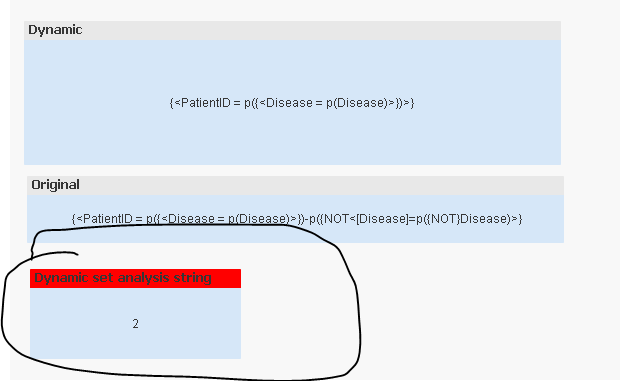
I am seeing 2 when i opened up your application. Is 2 not what you expect to see?
baylor2016
- Mark as New
- Bookmark
- Subscribe
- Mute
- Subscribe to RSS Feed
- Permalink
- Report Inappropriate Content
I checked the dynamic set analysis string, I did not enter correct set analysis string when items in both listboxes are selected. Sorry.
By the way, the following two set analysis strings return the same results.
{<PatientID = p({<Disease = p(Disease)>})>}
{<PatientID = p({<Disease = p(Disease)>}PatientID)>}
You use the first one, but most p() functions used in set analysis include field name. Does that make any difference?
Thanks
Longmatch
sunny_talwar
- Mark as New
- Bookmark
- Subscribe
- Mute
- Subscribe to RSS Feed
- Permalink
- Report Inappropriate Content
Today they both work the same way and there should be no difference between the two ways of writing this expression
