Unlock a world of possibilities! Login now and discover the exclusive benefits awaiting you.

- Qlik Community
- :
- All Forums
- :
- QlikView
- :
- Re: Variable is not working Properly
- Subscribe to RSS Feed
- Mark Topic as New
- Mark Topic as Read
- Float this Topic for Current User
- Bookmark
- Subscribe
- Mute
- Printer Friendly Page

 mhmmd_srf
- Mark as New
- Bookmark
- Subscribe
- Mute
- Subscribe to RSS Feed
- Permalink
- Report Inappropriate Content
Variable is not working Properly
HI All,
I have a report where I want to show value on Date Selection. If I select any date, value should be calculating till date.
So I need to use expression like :
=Count({<DT={'<=$(=$(v1))'}>}OrderQuantityOutstanding),
But first I wanted to check whether my variable is working or not. So instead of <= I use only =.
But then also my value is not matching.
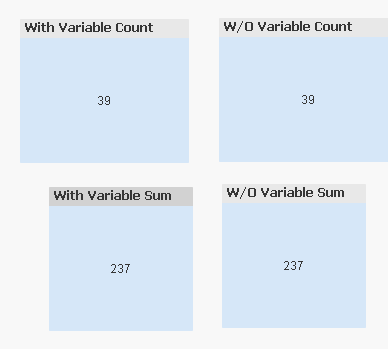
I have created two Text Object. With Variable and W/O Variable. Ideally these two should match. But with variable is showing less data.
I am attaching my file.
Could you please check and help me. I am not able to understand where I am making mistake.
Please help.
Thanks,
Sarif
Accepted Solutions

 sunny_talwar
- Mark as New
- Bookmark
- Subscribe
- Mute
- Subscribe to RSS Feed
- Permalink
- Report Inappropriate Content
One of the text box expression is doing the sum and the other one is doing a count.... You need to either do a sum in both or count
sunny_talwar
- Mark as New
- Bookmark
- Subscribe
- Mute
- Subscribe to RSS Feed
- Permalink
- Report Inappropriate Content
One of the text box expression is doing the sum and the other one is doing a count.... You need to either do a sum in both or count
sunny_talwar
- Mark as New
- Bookmark
- Subscribe
- Mute
- Subscribe to RSS Feed
- Permalink
- Report Inappropriate Content
Check the attached
mhmmd_srf
- Mark as New
- Bookmark
- Subscribe
- Mute
- Subscribe to RSS Feed
- Permalink
- Report Inappropriate Content
Ohhh...my GOD...
 I am really sorry Sunny...for wasting your time...
Thanks a lot...
