Unlock a world of possibilities! Login now and discover the exclusive benefits awaiting you.

- Qlik Community
- :
- All Forums
- :
- QlikView
- :
- Re: Week 52 in Jan
- Subscribe to RSS Feed
- Mark Topic as New
- Mark Topic as Read
- Float this Topic for Current User
- Bookmark
- Subscribe
- Mute
- Printer Friendly Page

- Mark as New
- Bookmark
- Subscribe
- Mute
- Subscribe to RSS Feed
- Permalink
- Report Inappropriate Content
Week 52 in Jan
Dear All,
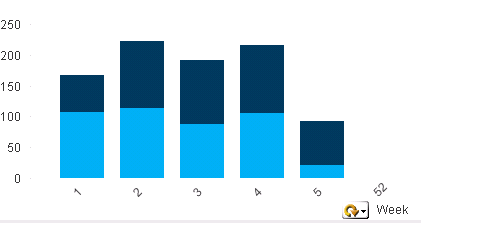
I have a cyclic group year/month/day in a chart and with the current calendar setting 1 Jan 2017 falls into week 52. My issue is when filtering data for Jan it shows week 52 as well. How can I just show week 52 in Dec 20166 and not in Jan2017 please?
Thanks
Neda
- « Previous Replies
-
- 1
- 2
- Next Replies »

 adamdavi3s
- Mark as New
- Bookmark
- Subscribe
- Mute
- Subscribe to RSS Feed
- Permalink
- Report Inappropriate Content
Hi Neda,
Just apply a similar logic when you generate your master calendar
So something like
=if(month(OrderDate)=1 and week(OrderDate)=52,0, 1) as weekcheckflag
However you'll still need to alter your expressions:
sum({<weekcheckflag={'1'}>} value)
Or select the flag as a default.
Just as a random aside, can I suggest keeping all expressions in variables and then the definitions of those variables in a file, this way it makes life a lot easier when you need to make this sort of change 
- « Previous Replies
-
- 1
- 2
- Next Replies »