Unlock a world of possibilities! Login now and discover the exclusive benefits awaiting you.

- Qlik Community
- :
- All Forums
- :
- QlikView
- :
- Re: Weekname(date) shows wrong week in 2021
- Subscribe to RSS Feed
- Mark Topic as New
- Mark Topic as Read
- Float this Topic for Current User
- Bookmark
- Subscribe
- Mute
- Printer Friendly Page

 jakobjosef
- Mark as New
- Bookmark
- Subscribe
- Mute
- Subscribe to RSS Feed
- Permalink
- Report Inappropriate Content
Weekname(date) shows wrong week in 2021
Hi,
unfortunately a function in qlikview-script is not working correctly:
weekname(date) shows the wrong week - for the 01.01.2021 it should be week "2020-53", but qlikview shows 2021-01; the weeks afterwards are wrong as well...
Is there a possibility that this error gets fixed?
Greetings
Jakob
Accepted Solutions
 yassinemhadhbi
- Mark as New
- Bookmark
- Subscribe
- Mute
- Subscribe to RSS Feed
- Permalink
- Report Inappropriate Content
Good morning
In QlikView variables ( Main tab : first tab in the script ) make sure that the variable BrokenWeeks is set to 0
Yassine Mhadhbi

 Taoufiq_Zarra
- Mark as New
- Bookmark
- Subscribe
- Mute
- Subscribe to RSS Feed
- Permalink
- Report Inappropriate Content
@jakobjosef for example
=weekname('01/01/2021',0) gives :
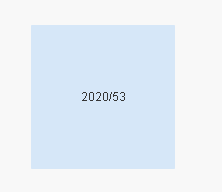
Taoufiq ZARRA
"Please LIKE posts and "Accept as Solution" if the provided solution is helpful "
(you can mark up to 3 "solutions") 😉
yassinemhadhbi
- Mark as New
- Bookmark
- Subscribe
- Mute
- Subscribe to RSS Feed
- Permalink
- Report Inappropriate Content
Good morning
In QlikView variables ( Main tab : first tab in the script ) make sure that the variable BrokenWeeks is set to 0
Yassine Mhadhbi
jakobjosef
- Mark as New
- Bookmark
- Subscribe
- Mute
- Subscribe to RSS Feed
- Permalink
- Report Inappropriate Content
Dear Yassinemhadbi,
this was exactly what I was looking for. Thank you so much for your hint, i would have never tried it this way.
Thanks a lot, also to your hint Taofiq!
Jakob
