Unlock a world of possibilities! Login now and discover the exclusive benefits awaiting you.

- Qlik Community
- :
- All Forums
- :
- QlikView
- :
- Whats up with year
- Subscribe to RSS Feed
- Mark Topic as New
- Mark Topic as Read
- Float this Topic for Current User
- Bookmark
- Subscribe
- Mute
- Printer Friendly Page

 bobbydave
- Mark as New
- Bookmark
- Subscribe
- Mute
- Subscribe to RSS Feed
- Permalink
- Report Inappropriate Content
Whats up with year
I am importing an excel sheet with 2017 text.
I am trying to convert it to a YEAR in QV and it appears as follows.
I've tried
Date#(F1, 'YYYY') appears as 2017.00000
Date(F1, 'YYYY') appears as 1905
Year(F1) appears as 1905

- « Previous Replies
-
- 1
- 2
- Next Replies »
Accepted Solutions

 sunny_talwar
- Mark as New
- Bookmark
- Subscribe
- Mute
- Subscribe to RSS Feed
- Permalink
- Report Inappropriate Content
sunny_talwar
- Mark as New
- Bookmark
- Subscribe
- Mute
- Subscribe to RSS Feed
- Permalink
- Report Inappropriate Content
May be try this
Year(Date#(F1, 'YYYY')) as Year
bobbydave
- Mark as New
- Bookmark
- Subscribe
- Mute
- Subscribe to RSS Feed
- Permalink
- Report Inappropriate Content
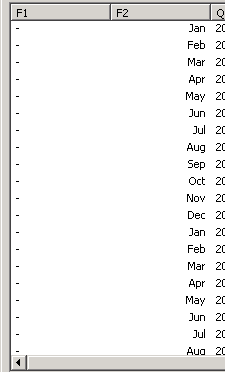
Appearing as blank now.
Screenshot attached

 sasiparupudi1
- Mark as New
- Bookmark
- Subscribe
- Mute
- Subscribe to RSS Feed
- Permalink
- Report Inappropriate Content
try round(F1)
bobbydave
- Mark as New
- Bookmark
- Subscribe
- Mute
- Subscribe to RSS Feed
- Permalink
- Report Inappropriate Content
same as above. blank
sasiparupudi1
- Mark as New
- Bookmark
- Subscribe
- Mute
- Subscribe to RSS Feed
- Permalink
- Report Inappropriate Content
Year(Trim(Subfield(F1,'.',1)))
Year(Date#(Trim(Subfield(F1,'.',1)),'YYYY'))
sunny_talwar
- Mark as New
- Bookmark
- Subscribe
- Mute
- Subscribe to RSS Feed
- Permalink
- Report Inappropriate Content
Can you try this
Num(Num#(F1))
or
Num(F1 * 1)

 niclaz79
- Mark as New
- Bookmark
- Subscribe
- Mute
- Subscribe to RSS Feed
- Permalink
- Report Inappropriate Content
Floor(Date#(F1, 'YYYY'))
 marcus_sommer
- Mark as New
- Bookmark
- Subscribe
- Mute
- Subscribe to RSS Feed
- Permalink
- Report Inappropriate Content
It seems that your field contained a string with numbers whereby it isn't a date else it's just a year-value. Therefore try something like this:
num(F1)
or
num(num#(F1, '####.######', '', '.'))
- Marcus
 MarcoWedel
- Mark as New
- Bookmark
- Subscribe
- Mute
- Subscribe to RSS Feed
- Permalink
- Report Inappropriate Content
another one:
MakeDate(F1)

- « Previous Replies
-
- 1
- 2
- Next Replies »