Unlock a world of possibilities! Login now and discover the exclusive benefits awaiting you.

- Qlik Community
- :
- All Forums
- :
- QlikView
- :
- Re: Wrapping dimension text using chr13
- Subscribe to RSS Feed
- Mark Topic as New
- Mark Topic as Read
- Float this Topic for Current User
- Bookmark
- Subscribe
- Mute
- Printer Friendly Page

 alisonpwallis
- Mark as New
- Bookmark
- Subscribe
- Mute
- Subscribe to RSS Feed
- Permalink
- Report Inappropriate Content
Wrapping dimension text using chr13
Dear All,
I am trying to create a wordwrap on the dimension labels for a chart. I've created the following calculation:
=left([Program Title],15)& chr(13)&mid([Program Title],16)
My questions are :
Is there a way of making it so that the split occurs between a specific number of words rather than just after the 15th character?
Also, this is not actually working - I get the first part of the Program Title and then a big space and the second part doesn't appear at all. What is wrong with my syntax? Or is there something I'm missing somewhere else?
Thanks for your help
Alison
- « Previous Replies
-
- 1
- 2
- Next Replies »

 rbecher
- Mark as New
- Bookmark
- Subscribe
- Mute
- Subscribe to RSS Feed
- Permalink
- Report Inappropriate Content
Maybe it's version related?
alisonpwallis
- Mark as New
- Bookmark
- Subscribe
- Mute
- Subscribe to RSS Feed
- Permalink
- Report Inappropriate Content
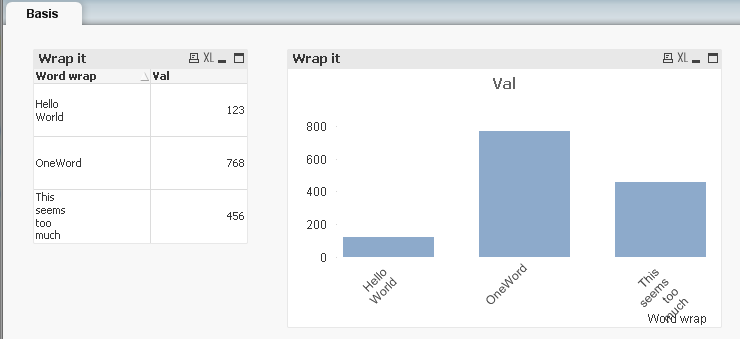
I can open your example file and it works like the image that you've posted here....
I'll keep trying different things!
Thanks again for your help
 Gysbert_Wassena
- Mark as New
- Bookmark
- Subscribe
- Mute
- Subscribe to RSS Feed
- Permalink
- Report Inappropriate Content
No, it's not version related afaict. But it only works with the dimension label orientation set to diagonal or vertical. And only for the default Orientation style.
talk is cheap, supply exceeds demand
alisonpwallis
- Mark as New
- Bookmark
- Subscribe
- Mute
- Subscribe to RSS Feed
- Permalink
- Report Inappropriate Content
Hi All
Thanks for your help with this. Following Gysbert's answer I think it seems to be that I can only wrap the text on the vertical orientation. I wanted to have the text horizontal (because it's so long!) so I think this may not be possible. Perhaps it will come in a new version of Qlikview.
Thanks
Alison

- « Previous Replies
-
- 1
- 2
- Next Replies »