Unlock a world of possibilities! Login now and discover the exclusive benefits awaiting you.

- Qlik Community
- :
- All Forums
- :
- QlikView
- :
- Re: YTD Calculation
- Subscribe to RSS Feed
- Mark Topic as New
- Mark Topic as Read
- Float this Topic for Current User
- Bookmark
- Subscribe
- Mute
- Printer Friendly Page

- Mark as New
- Bookmark
- Subscribe
- Mute
- Subscribe to RSS Feed
- Permalink
- Report Inappropriate Content
YTD Calculation
Dear Friends,
I am trying to create one Pivot table. Here, i want to calculate Week and YTD using My Date field with the calculation
For Week Calculation, I am using this
=sum({<C_DESCRIPTION={'Reportable','Recordable','Restricted work Cases','Lost Work Cases'} >} S_COUNT)
For Year Calculation, I am using this
Sum({<Year=, Month=, Quarter=, Week=, DateField=, DateNum={">=$(=Num(YearStart(Max(DateNum))))<=$(=Max(DateNum))"}>} S_COUNT)
My Master Calendar is
MinMaxDate:
Load
//Num(Yearstart(Min(S_CREATED_DATE))) as MinDate,
Num(Min(S_CREATED_DATE)) as MinDate,
Num(Max(S_CREATED_DATE)) as MaxDate
Resident Facts;
Let vMinDate = Peek('MinDate',0,'MinMaxDate');
Let vMaxDate = Peek('MaxDate',0,'MinMaxDate');
Drop Table MinMaxDate;
Temp_calendar:
load $(vMinDate) + Recno() - 1 as Date autogenerate $(vMaxDate)-$(vMinDate) +1;
Master_calender:
Load //MonthName(Date) as MonthYear,
Date#(Date(Date),'DD-MM-YYYY') as Date,
//time(date#( Date , 'YYYYMMDDhhmmss'), 'DD:MM"YYYY hh:mm:ss') as Date,
Year(Date) as Year,
Day(Date) as Day,
Week(Date) as Week,
Month(Date) as Month,
'Q' & Ceil(month(Date)/3) as Quarter
Resident Temp_calendar;
drop Table Temp_calendar;
So, Now i am expecting only Week and Year Calculation using Sum(S_COUNT)
Please help me
- « Previous Replies
-
- 1
- 2
- Next Replies »
Accepted Solutions

 sunny_talwar
- Mark as New
- Bookmark
- Subscribe
- Mute
- Subscribe to RSS Feed
- Permalink
- Report Inappropriate Content
Yes, try that
Date(Floor(Date)) as Date
or
Date(Floor(Date#(Date, 'MM/DD/YYYY hh:mm:ss TT'))) as Date
sunny_talwar
- Mark as New
- Bookmark
- Subscribe
- Mute
- Subscribe to RSS Feed
- Permalink
- Report Inappropriate Content
Where is DateNum field in your master calendar?
Also, I think it never makes sense to use Date#(Date()) function in this order. AFAIK, the order should be 1st Date() and then Date#() because Date# is an interpretation function. If your date is already recognized using Date(), then you probably won't even need Date#() after it.
- Mark as New
- Bookmark
- Subscribe
- Mute
- Subscribe to RSS Feed
- Permalink
- Report Inappropriate Content
Sunny,
Can you please have a look of my attachment.
sunny_talwar
- Mark as New
- Bookmark
- Subscribe
- Mute
- Subscribe to RSS Feed
- Permalink
- Report Inappropriate Content
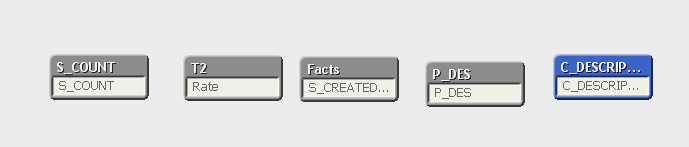
You data is not linked to each other appropriately
- Mark as New
- Bookmark
- Subscribe
- Mute
- Subscribe to RSS Feed
- Permalink
- Report Inappropriate Content
Sunny, In my application it's connected with 1-1 Map. But unfortunately, as per our company policy we cant share the data.
This Case, Can you please have a look of Pivot table. In that, i want to calculate Week and YTD. In fact, My master calendar is not good. Can you please help me for this.
Thanks
- Mark as New
- Bookmark
- Subscribe
- Mute
- Subscribe to RSS Feed
- Permalink
- Report Inappropriate Content
Sunny,
I got it.
Date#(Date()) -- What i need to written on this?
My Date Format showing MM/DD/YYYY HH:MM:SS TT
Might be this -- date(floor(Date))
sunny_talwar
- Mark as New
- Bookmark
- Subscribe
- Mute
- Subscribe to RSS Feed
- Permalink
- Report Inappropriate Content
Yes, try that
Date(Floor(Date)) as Date
or
Date(Floor(Date#(Date, 'MM/DD/YYYY hh:mm:ss TT'))) as Date
- Mark as New
- Bookmark
- Subscribe
- Mute
- Subscribe to RSS Feed
- Permalink
- Report Inappropriate Content
Sunny, Got it.
I have one more issue.
I do have one chart(For Ref PFA)
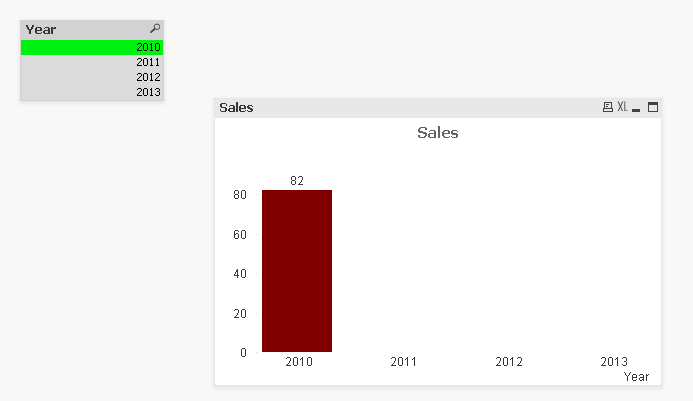
So here i have list box also. When i want to click any year i want to show the selected data and remaining all i want to hide.
But, Here i want to show default all graph. I want to pop up only selected Year and remaining Data should be null.
If i select 2010 --> I want to show 2010, 2011, 2012, 2013 Data as default. But, Only 2010 Data should be visible left all need to hidden.
sunny_talwar
- Mark as New
- Bookmark
- Subscribe
- Mute
- Subscribe to RSS Feed
- Permalink
- Report Inappropriate Content
Like this?
- Mark as New
- Bookmark
- Subscribe
- Mute
- Subscribe to RSS Feed
- Permalink
- Report Inappropriate Content
Yes, Can you plz explain me
You are taken only this Round(Avg(Sales)) + Sum({1} 0)
What is the use of Sum({1} 0)
Any changes

- « Previous Replies
-
- 1
- 2
- Next Replies »