Unlock a world of possibilities! Login now and discover the exclusive benefits awaiting you.

- Qlik Community
- :
- All Forums
- :
- QlikView
- :
- Re: YTD Calculation
- Subscribe to RSS Feed
- Mark Topic as New
- Mark Topic as Read
- Float this Topic for Current User
- Bookmark
- Subscribe
- Mute
- Printer Friendly Page

 nareshthavidish
- Mark as New
- Bookmark
- Subscribe
- Mute
- Subscribe to RSS Feed
- Permalink
- Report Inappropriate Content
YTD Calculation
Hi ,
I need to compare this year YTD with Lastyear YTD sales.
Date= SoldDate
Ex: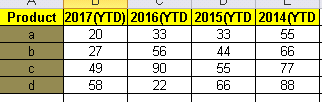
Thanks..
- « Previous Replies
- Next Replies »
Accepted Solutions

 sunny_talwar
- Mark as New
- Bookmark
- Subscribe
- Mute
- Subscribe to RSS Feed
- Permalink
- Report Inappropriate Content
Try this:
=Sum({<SoldDate = {
"$(='>=' & Date(YearStart(Max(SoldDate), 0), 'M/D/YYYY') & '<=' & Date(AddYears(Max(SoldDate), 0), 'M/D/YYYY'))",
"$(='>=' & Date(YearStart(Max(SoldDate), -1), 'M/D/YYYY') & '<=' & Date(AddYears(Max(SoldDate), -1), 'M/D/YYYY'))",
"$(='>=' & Date(YearStart(Max(SoldDate), -2), 'M/D/YYYY') & '<=' & Date(AddYears(Max(SoldDate), -2), 'M/D/YYYY'))",
"$(='>=' & Date(YearStart(Max(SoldDate), -3), 'M/D/YYYY') & '<=' & Date(AddYears(Max(SoldDate), -3), 'M/D/YYYY'))"
}, SoldMonth, SoldYear>}ESTCUST)


- Mark as New
- Bookmark
- Subscribe
- Mute
- Subscribe to RSS Feed
- Permalink
- Report Inappropriate Content
Create Straight table and the use these expressions and use dim as Product
2017(YTD)
Sum({<Year={'Only({<Year = {'$(=Max(Year))'}>}Year)'}, Month=, Quarter=, Week=, SoldDate={">=$(=Num(YearStart(Max(SoldDate))))<=$(=Max(SoldDate))"}>} Sales)
2016(YTD)
Sum({<Year={'Only({<Year = {'$(=Max(Year)-1)'}>}Year)'}, Month=, Quarter=, Week=, SoldDate={">=$(=Num(YearStart(Max(SoldDate))))<=$(=Max(SoldDate))"}>} Sales)
2015(YTD)
Sum({<Year={'Only({<Year = {'$(=Max(Year)-2)'}>}Year)'}, Month=, Quarter=, Week=, SoldDate={">=$(=Num(YearStart(Max(SoldDate))))<=$(=Max(SoldDate))"}>} Sales)
2014(YTD)
Sum({<Year={'Only({<Year = {'$(=Max(Year)-3)'}>}Year)'}, Month=, Quarter=, Week=, SoldDate={">=$(=Num(YearStart(Max(SoldDate))))<=$(=Max(SoldDate))"}>} Sales)
sunny_talwar
- Mark as New
- Bookmark
- Subscribe
- Mute
- Subscribe to RSS Feed
- Permalink
- Report Inappropriate Content
More like this
Max Year
Sum({<Date = {"$(='>=' & Date(YearStart(Max(Date), 0), 'MM/DD/YYYY') & '<=' & Date(AddYears(Max(Date), 0), 'MM/DD/YYYY'))"}, Month, Year, Quarter, Week, Year>}Sales)
Max Year - 1
Sum({<Date = {"$(='>=' & Date(YearStart(Max(Date), -1), 'MM/DD/YYYY') & '<=' & Date(AddYears(Max(Date), -1), 'MM/DD/YYYY'))"}, Month, Year, Quarter, Week, Year>}Sales)
Max Year - 2
Sum({<Date = {"$(='>=' & Date(YearStart(Max(Date), -2), 'MM/DD/YYYY') & '<=' & Date(AddYears(Max(Date), -2), 'MM/DD/YYYY'))"}, Month, Year, Quarter, Week, Year>}Sales)
Max Year - 3
Sum({<Date = {"$(='>=' & Date(YearStart(Max(Date), -3), 'MM/DD/YYYY') & '<=' & Date(AddYears(Max(Date), -3), 'MM/DD/YYYY'))"}, Month, Year, Quarter, Week, Year>}Sales)
I have assumed your date to be in the format MM/DD/YYYY, but if it is in another format, please change the expression accordingly to change all MM/DD/YYYY to your actual date formats.
nareshthavidish- Mark as New
- Bookmark
- Subscribe
- Mute
- Subscribe to RSS Feed
- Permalink
- Report Inappropriate Content
Thanks..
Can we get in single expression.
Ex:
2017 - 233
2016- 334
Thanks..
nareshthavidish- Mark as New
- Bookmark
- Subscribe
- Mute
- Subscribe to RSS Feed
- Permalink
- Report Inappropriate Content
Hi,
I have to show as below format.ow to get this i single expression.
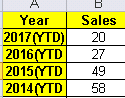
Thanks..
nareshthavidish- Mark as New
- Bookmark
- Subscribe
- Mute
- Subscribe to RSS Feed
- Permalink
- Report Inappropriate Content
Hi Sunny,
Can we get with in one expression.
Thanks..
sunny_talwar
- Mark as New
- Bookmark
- Subscribe
- Mute
- Subscribe to RSS Feed
- Permalink
- Report Inappropriate Content
We might be able to, but I would need to look at what you have.... would you be able to share a sample?
nareshthavidish- Mark as New
- Bookmark
- Subscribe
- Mute
- Subscribe to RSS Feed
- Permalink
- Report Inappropriate Content
Hi,
After using the 4 expressions i got below result.Which is not correct.
I need to show in single column.
EX:For state Albuqerque.

sunny_talwar
- Mark as New
- Bookmark
- Subscribe
- Mute
- Subscribe to RSS Feed
- Permalink
- Report Inappropriate Content
Can you attach you qvw?
nareshthavidish- Mark as New
- Bookmark
- Subscribe
- Mute
- Subscribe to RSS Feed
- Permalink
- Report Inappropriate Content
Hi,
Please find the attached is the application.
Thanks..

- « Previous Replies
- Next Replies »