Unlock a world of possibilities! Login now and discover the exclusive benefits awaiting you.

- Qlik Community
- :
- All Forums
- :
- QlikView
- :
- Re: accumulated Sum
- Subscribe to RSS Feed
- Mark Topic as New
- Mark Topic as Read
- Float this Topic for Current User
- Bookmark
- Subscribe
- Mute
- Printer Friendly Page

 rohit214
- Mark as New
- Bookmark
- Subscribe
- Mute
- Subscribe to RSS Feed
- Permalink
- Report Inappropriate Content
accumulated Sum
Hi All,
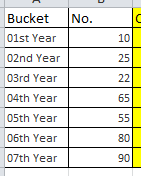
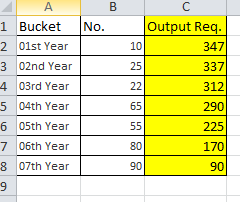
I have a table and i want the result shown below
Data Table
Required Output
Thanks
Rohit
Accepted Solutions

 MK_QSL
- Mark as New
- Bookmark
- Subscribe
- Mute
- Subscribe to RSS Feed
- Permalink
- Report Inappropriate Content
Create a straight Table
Dimension = Bucket
Expression
SUM(No.)
and
SUM({1}TOTAL No.)-RangeSum(ABOVE(SUM(No.),1,RowNo()))
Hope this helps...
UPDATE:
There is another option..
RangeSum(Below(SUM(No.),0,Max(TOTAL Aggr(RowNo(),Bucket))))
MK_QSL
- Mark as New
- Bookmark
- Subscribe
- Mute
- Subscribe to RSS Feed
- Permalink
- Report Inappropriate Content
Create a straight Table
Dimension = Bucket
Expression
SUM(No.)
and
SUM({1}TOTAL No.)-RangeSum(ABOVE(SUM(No.),1,RowNo()))
Hope this helps...
UPDATE:
There is another option..
RangeSum(Below(SUM(No.),0,Max(TOTAL Aggr(RowNo(),Bucket))))

 brijesh1991
- Mark as New
- Bookmark
- Subscribe
- Mute
- Subscribe to RSS Feed
- Permalink
- Report Inappropriate Content
PFA qvw
 kangaroomac
- Mark as New
- Bookmark
- Subscribe
- Mute
- Subscribe to RSS Feed
- Permalink
- Report Inappropriate Content
Hiya,
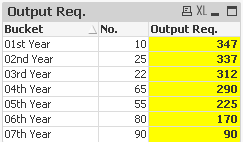
If you would like to add the other field (No.) as well, you'll have to do it in the expression (with no aggregation), not as a dimension (else the first value 347 will be copied all the way down).
I've attached a QV Sample.

- Mark as New
- Bookmark
- Subscribe
- Mute
- Subscribe to RSS Feed
- Permalink
- Report Inappropriate Content
I can not see your input data, but what do you think about using Accumulation property? (Properties/Expression tab - under expression list).
regards
Darek
rohit214
- Mark as New
- Bookmark
- Subscribe
- Mute
- Subscribe to RSS Feed
- Permalink
- Report Inappropriate Content
Thanks to all
Regards
Rohit