Unlock a world of possibilities! Login now and discover the exclusive benefits awaiting you.

- Qlik Community
- :
- All Forums
- :
- QlikView
- :
- Re: adapt rank for Dimensionality
- Subscribe to RSS Feed
- Mark Topic as New
- Mark Topic as Read
- Float this Topic for Current User
- Bookmark
- Subscribe
- Mute
- Printer Friendly Page

 Ribeiro
- Mark as New
- Bookmark
- Subscribe
- Mute
- Subscribe to RSS Feed
- Permalink
- Report Inappropriate Content
adapt rank for Dimensionality
Set analysis:
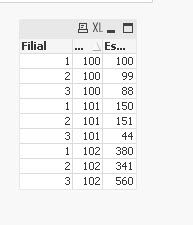
=Codigo & ' ' & concat(aggr(' - '&' FL: ' & Filial & ' ET: ' & NUM(sum(Estoque),'000000')& ' RK: ' &NUM(rank(sum(Estoque)),'00'), Codigo, Filial),'',aggr(rank(sum(Estoque)),Codigo,Filial))
The result of the set analysis:
100 100 - FL: 2 ET: 000099 RK: 01 - FL: 3 ET: 000088 RK: 02 - FL: 1 ET: 000000 RK: 03
101 101 - FL: 2 ET: 000151 RK: 01 - FL: 1 ET: 000150 RK: 02 - FL: 3 ET: 000044 RK: 03
102 102 - FL: 3 ET: 000560 RK: 01 - FL: 1 ET: 000380 RK: 02 - FL: 2 ET: 000341 RK: 03
What I need to do
It's possible?
| Codigo | RK: 01 | RK: 02 | RK: 03 |
| 100 | FL: 2 ET: 000099 | FL: 3 ET: 000088 | FL: 1 ET: 000000 |
| 101 | FL: 2 ET: 000151 | FL: 1 ET: 000150 | FL: 3 ET: 000044 |
| 102 | FL: 3 ET: 000560 | FL: 1 ET: 000380 | FL: 2 ET: 000341 |
- Tags:
- qlikview_scripting
Accepted Solutions

 MayilVahanan
- Mark as New
- Bookmark
- Subscribe
- Mute
- Subscribe to RSS Feed
- Permalink
- Report Inappropriate Content
Hi @Ribeiro
May be, try like attachment.
Please close the thread by marking correct answer & give likes if you like the post.
 Kushal_Chawda
- Mark as New
- Bookmark
- Subscribe
- Mute
- Subscribe to RSS Feed
- Permalink
- Report Inappropriate Content
@Ribeiro try like attached if you want your Rank to be dynamic so that you don't need to create expression for each rank manually
MayilVahanan
- Mark as New
- Bookmark
- Subscribe
- Mute
- Subscribe to RSS Feed
- Permalink
- Report Inappropriate Content
Hi @Ribeiro
May be, try like attachment.
Please close the thread by marking correct answer & give likes if you like the post.
Kushal_Chawda
- Mark as New
- Bookmark
- Subscribe
- Mute
- Subscribe to RSS Feed
- Permalink
- Report Inappropriate Content
@Ribeiro try like attached if you want your Rank to be dynamic so that you don't need to create expression for each rank manually
Ribeiro
- Mark as New
- Bookmark
- Subscribe
- Mute
- Subscribe to RSS Feed
- Permalink
- Report Inappropriate Content
Ribeiro
- Mark as New
- Bookmark
- Subscribe
- Mute
- Subscribe to RSS Feed
- Permalink
- Report Inappropriate Content
Ribeiro
- Mark as New
- Bookmark
- Subscribe
- Mute
- Subscribe to RSS Feed
- Permalink
- Report Inappropriate Content
=Codigo & ' ' & concat(aggr(' - '&' FL: ' & Filial & ' ET: ' & NUM(sum(Estoque),'000000')& ' RK: ' &NUM(rank(sum(Estoque)),'00'), Codigo, Filial),'',aggr(rank(sum(Estoque)),Codigo,Filial))
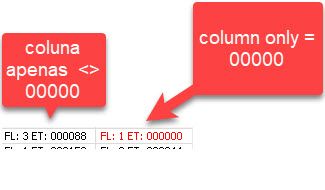
I need to separate into two columns = 0000 and <> 00000
in the set analysis above