Unlock a world of possibilities! Login now and discover the exclusive benefits awaiting you.

- Qlik Community
- :
- All Forums
- :
- QlikView
- :
- Re: alert
- Subscribe to RSS Feed
- Mark Topic as New
- Mark Topic as Read
- Float this Topic for Current User
- Bookmark
- Subscribe
- Mute
- Printer Friendly Page

 master_student
- Mark as New
- Bookmark
- Subscribe
- Mute
- Subscribe to RSS Feed
- Permalink
- Report Inappropriate Content
alert
Hello Everyone,
I need your help as usual 
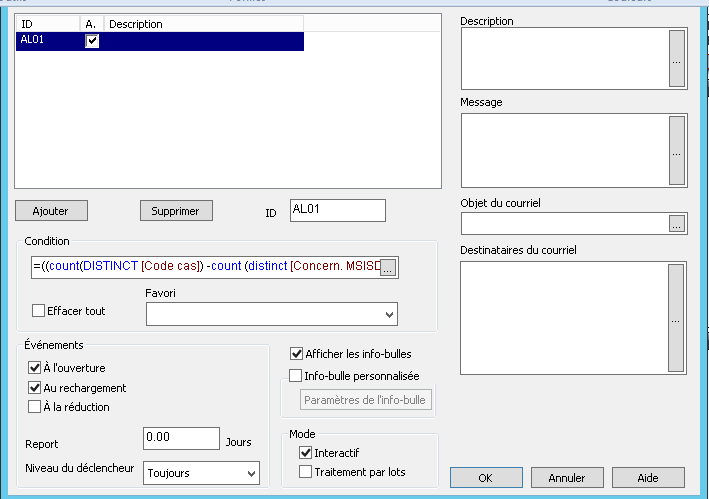
I would like to add an alert to one of my dashbords. This is the expression : =((count(DISTINCT [Code cas]) -count (distinct [Concern. MSISDN]) )/ count (distinct [Concern. MSISDN]))*100. A dimension Type should be selected
How to add this condition to my experssion?
Thanks
 hemanthaanichet
- Mark as New
- Bookmark
- Subscribe
- Mute
- Subscribe to RSS Feed
- Permalink
- Report Inappropriate Content
Hi Wiem
Could able provide the sample data ?
or
Could elaborate your need little more
Regards
Hemanth

- Mark as New
- Bookmark
- Subscribe
- Mute
- Subscribe to RSS Feed
- Permalink
- Report Inappropriate Content
Add a textbox with your expression and format and make sure it is displaying correctly..
Then use conditional show hid
Textbox > layout > Enable Conditional and the the expression:
=getselectedcount(Yourfield) <> 0
Textbox > layout > Layer > custom = 5
If the dimension is not selected, the alert will pop up
master_student
- Mark as New
- Bookmark
- Subscribe
- Mute
- Subscribe to RSS Feed
- Permalink
- Report Inappropriate Content
where to add the getselectedcount(Yourfield) <> 0 condition. here's my alert :