Unlock a world of possibilities! Login now and discover the exclusive benefits awaiting you.

- Qlik Community
- :
- All Forums
- :
- QlikView
- :
- background color
- Subscribe to RSS Feed
- Mark Topic as New
- Mark Topic as Read
- Float this Topic for Current User
- Bookmark
- Subscribe
- Mute
- Printer Friendly Page

 vanderson009
- Mark as New
- Bookmark
- Subscribe
- Mute
- Subscribe to RSS Feed
- Permalink
- Report Inappropriate Content
background color
I have created one pivot table and pivoting dimension to header, Once i pivoting dimension then background color automatically changes to white however i want dimension is in amber color, without pivoting its showing amber background.
Thanks,
Villyee
- « Previous Replies
-
- 1
- 2
- Next Replies »

 Gysbert_Wassena
- Mark as New
- Bookmark
- Subscribe
- Mute
- Subscribe to RSS Feed
- Permalink
- Report Inappropriate Content
Please post a small qlikview document that show the problem.
talk is cheap, supply exceeds demand

 robert_mika
- Mark as New
- Bookmark
- Subscribe
- Mute
- Subscribe to RSS Feed
- Permalink
- Report Inappropriate Content
Maybe this will help:
vanderson009
- Mark as New
- Bookmark
- Subscribe
- Mute
- Subscribe to RSS Feed
- Permalink
- Report Inappropriate Content
Hi
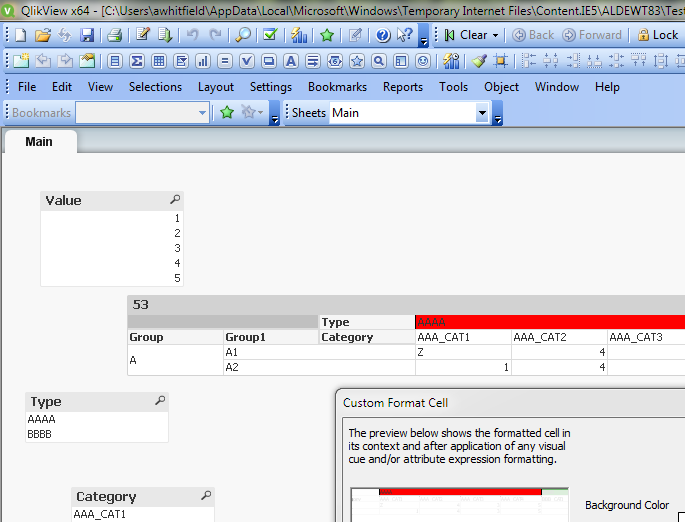
PFA attached test application, here i am trying to change background color of header 'AAAA' as red but it not working.
Thanks,
Villyee
 awhitfield
- Mark as New
- Bookmark
- Subscribe
- Mute
- Subscribe to RSS Feed
- Permalink
- Report Inappropriate Content
Hi villyee,
Check out the following thread, it may be useful:
https://community.qlik.com/message/1004404#1004404
HTH
Andy
vanderson009
- Mark as New
- Bookmark
- Subscribe
- Mute
- Subscribe to RSS Feed
- Permalink
- Report Inappropriate Content

Dimensionality is not working in my scenario, i tried it.
I want header 'AAAA' color as red, however its not appearing cause that column having one null record.
Thanks,
Villyee
vanderson009
- Mark as New
- Bookmark
- Subscribe
- Mute
- Subscribe to RSS Feed
- Permalink
- Report Inappropriate Content

Dimensionality is not working in my scenario, i tried it.
I want header 'AAAA' color as red, however its not appearing cause that column having one null record.
Thanks,
Villyee
awhitfield
- Mark as New
- Bookmark
- Subscribe
- Mute
- Subscribe to RSS Feed
- Permalink
- Report Inappropriate Content
You could cheat by setting custom cell format to the Type row
vanderson009
- Mark as New
- Bookmark
- Subscribe
- Mute
- Subscribe to RSS Feed
- Permalink
- Report Inappropriate Content
I tried custom color as well but not getting desired output.
I want color depending on Type, means if AAAA then red, if BBBB then green
Gysbert_Wassena- Mark as New
- Bookmark
- Subscribe
- Mute
- Subscribe to RSS Feed
- Permalink
- Report Inappropriate Content
Disable the Suppress Zero-Values option on the presentation tab.
talk is cheap, supply exceeds demand

- « Previous Replies
-
- 1
- 2
- Next Replies »