Unlock a world of possibilities! Login now and discover the exclusive benefits awaiting you.

- Qlik Community
- :
- All Forums
- :
- QlikView
- :
- conditional in pivot table
- Subscribe to RSS Feed
- Mark Topic as New
- Mark Topic as Read
- Float this Topic for Current User
- Bookmark
- Subscribe
- Mute
- Printer Friendly Page

 volakakis
- Mark as New
- Bookmark
- Subscribe
- Mute
- Subscribe to RSS Feed
- Permalink
- Report Inappropriate Content
conditional in pivot table
Hi to all (really excited because I am really new to QlikView)
I have created a pivot Table as you can see here
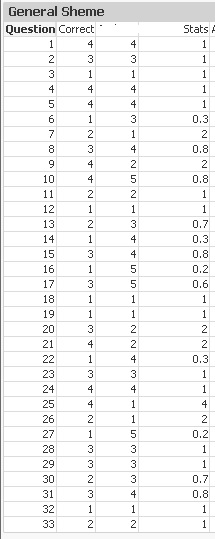
now I have a question:
in the expression Stats (which is column (Correct)/(next column)) is there a way that I can keep only the result if the value is 1 and if not then there will be no result?
Thank you all in advance
Accepted Solutions

 maxgro
- Mark as New
- Bookmark
- Subscribe
- Mute
- Subscribe to RSS Feed
- Permalink
- Report Inappropriate Content
try
if( (Correct)/(next column)) = 1, (Correct)/(next column)) )
another option is in "Visual Cues" tab
you can set the color white or tranparent when your expression is >= 1.0001 and when is <= 0.9999
The first option changes the value
The second hides the values
maxgro
- Mark as New
- Bookmark
- Subscribe
- Mute
- Subscribe to RSS Feed
- Permalink
- Report Inappropriate Content
try
if( (Correct)/(next column)) = 1, (Correct)/(next column)) )
another option is in "Visual Cues" tab
you can set the color white or tranparent when your expression is >= 1.0001 and when is <= 0.9999
The first option changes the value
The second hides the values
volakakis
- Mark as New
- Bookmark
- Subscribe
- Mute
- Subscribe to RSS Feed
- Permalink
- Report Inappropriate Content
I dont want to hide the values because in the next step I want to aggregate all 1 so I will use the first option... Thank you very much
