Unlock a world of possibilities! Login now and discover the exclusive benefits awaiting you.

- Qlik Community
- :
- All Forums
- :
- QlikView
- :
- convert in date & time format
- Subscribe to RSS Feed
- Mark Topic as New
- Mark Topic as Read
- Float this Topic for Current User
- Bookmark
- Subscribe
- Mute
- Printer Friendly Page

 userid128223
- Mark as New
- Bookmark
- Subscribe
- Mute
- Subscribe to RSS Feed
- Permalink
- Report Inappropriate Content
convert in date & time format
Hi Everyone
I have following call:
LET vDate= Peek('StartD',$(i),TableA)
vDate = 04/06/2017 13:27:15
How can i convert it into:
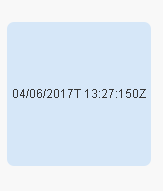
vDate=2017-04-06T13:27:150Z
- Tags:
- qlikview_scripting
Accepted Solutions

 sunny_talwar
- Mark as New
- Bookmark
- Subscribe
- Mute
- Subscribe to RSS Feed
- Permalink
- Report Inappropriate Content
May be this
LET vDate = Date(Date#(Peek('StartD',$(i),TableA), 'MM/DD/YYYY h:mm:ss'), 'MM/DD/YYYYT h:mm:ss0Z');
or
LET vDate = Text(Date(Date#(Peek('StartD',$(i),TableA), 'MM/DD/YYYY h:mm:ss'), 'MM/DD/YYYYT h:mm:ss0Z'));

- Mark as New
- Bookmark
- Subscribe
- Mute
- Subscribe to RSS Feed
- Permalink
- Report Inappropriate Content
What is the 0Z ??
sunny_talwar
- Mark as New
- Bookmark
- Subscribe
- Mute
- Subscribe to RSS Feed
- Permalink
- Report Inappropriate Content
May be this
LET vDate = Date(Date#(Peek('StartD',$(i),TableA), 'MM/DD/YYYY h:mm:ss'), 'MM/DD/YYYYT h:mm:ss0Z');
or
LET vDate = Text(Date(Date#(Peek('StartD',$(i),TableA), 'MM/DD/YYYY h:mm:ss'), 'MM/DD/YYYYT h:mm:ss0Z'));

 antoniotiman
- Mark as New
- Bookmark
- Subscribe
- Mute
- Subscribe to RSS Feed
- Permalink
- Report Inappropriate Content
Hi,
I assume Your Timestamp Format is
SET TimestampFormat='MM/DD/YYYY hh:mm:ss[.fff]';
=Replace(Timestamp(vDate,'YYYY-MM-DD_hh:mm:ss0Z'),'_','T') -> 2017-04-06T13:27:150Z
Regards,
Antonio
userid128223
- Mark as New
- Bookmark
- Subscribe
- Mute
- Subscribe to RSS Feed
- Permalink
- Report Inappropriate Content
Hi Sunny
T in middle is not showing up & it is leaving spaces in between.
sunny_talwar
- Mark as New
- Bookmark
- Subscribe
- Mute
- Subscribe to RSS Feed
- Permalink
- Report Inappropriate Content
Don't need space
LET vDate = =Replace(Date(Date#(Peek('StartD',$(i),TableA), 'MM/DD/YYYY h:mm:ss'), 'MM/DD/YYYY@ h:mm:ss0Z'), '@', 'T');
Tried it with static date
=Replace(Date(Date#('04/06/2017 13:27:15', 'MM/DD/YYYY h:mm:ss'), 'MM/DD/YYYY@ h:mm:ss0Z'), '@', 'T')