Unlock a world of possibilities! Login now and discover the exclusive benefits awaiting you.

- Qlik Community
- :
- All Forums
- :
- QlikView
- :
- Re: converting into date
- Subscribe to RSS Feed
- Mark Topic as New
- Mark Topic as Read
- Float this Topic for Current User
- Bookmark
- Subscribe
- Mute
- Printer Friendly Page

- Mark as New
- Bookmark
- Subscribe
- Mute
- Subscribe to RSS Feed
- Permalink
- Report Inappropriate Content
converting into date
hi ,
the data i am loading has a date format like 20160705 and i need to change it to date format.
is there a way i can change in the load statement?
regards,
marvin

 sunny_talwar
- Mark as New
- Bookmark
- Subscribe
- Mute
- Subscribe to RSS Feed
- Permalink
- Report Inappropriate Content
Yes you can, try this:
LOAD Date(Date#(DateField, 'YYYYMMDD'), 'MM/DD/YYYY') as DateField
....
Also read here:
- Mark as New
- Bookmark
- Subscribe
- Mute
- Subscribe to RSS Feed
- Permalink
- Report Inappropriate Content
use
date#(yourdatefield,'YYYYMMDD')
you can convert it to other dateformat (if not your Standard dateformat)
date(date#(yourdatefield,'YYYYMMDD'),'MM/DD/YYYY')
- Mark as New
- Bookmark
- Subscribe
- Mute
- Subscribe to RSS Feed
- Permalink
- Report Inappropriate Content
Please try :
Date(Floor(Date#(your_date_field, 'YYYYMMDD')), 'MM/DD/YYYY')
- Mark as New
- Bookmark
- Subscribe
- Mute
- Subscribe to RSS Feed
- Permalink
- Report Inappropriate Content
cool thanks i will give it a shot
- Mark as New
- Bookmark
- Subscribe
- Mute
- Subscribe to RSS Feed
- Permalink
- Report Inappropriate Content
The value gives me this 59097/08/16. it seems the year is in string?

 florentina_doga
- Mark as New
- Bookmark
- Subscribe
- Mute
- Subscribe to RSS Feed
- Permalink
- Report Inappropriate Content
or
=date(MakeDate(left(data,4),mid(data,5,2),right(data,2)),'DD-MMM-YYYY')
 Chanty4u
- Mark as New
- Bookmark
- Subscribe
- Mute
- Subscribe to RSS Feed
- Permalink
- Report Inappropriate Content
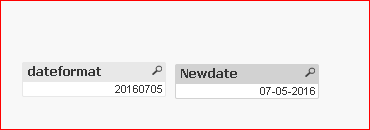
try below script with load
Format:
LOAD * INLINE [
dateformat
20160705
];
Result:
LOAD *,
Date(Date#(dateformat,'YYYYMMDD'),'MM-DD-YYYY') AS Newdate
Resident Format;