Unlock a world of possibilities! Login now and discover the exclusive benefits awaiting you.

- Qlik Community
- :
- All Forums
- :
- QlikView
- :
- Re: create a salary budget table
- Subscribe to RSS Feed
- Mark Topic as New
- Mark Topic as Read
- Float this Topic for Current User
- Bookmark
- Subscribe
- Mute
- Printer Friendly Page

 doespirito
- Mark as New
- Bookmark
- Subscribe
- Mute
- Subscribe to RSS Feed
- Permalink
- Report Inappropriate Content
create a salary budget table
Hello everyone,
I would like to create a table of staff costs from 3 tables:
- a hiring table with the year at the date of hiring
- a table with salary data
- a table with the calendar for which I want to create the budget.
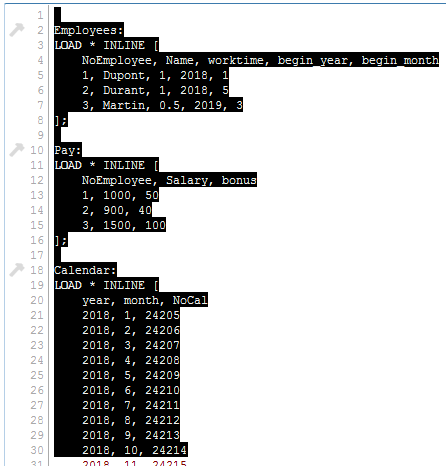
I first try to join the hiring table with my calendar by creating only the months from which people are hired.
But that does not work.
In the end, I want a table of 90 records: 36 for Dupont, 32 for Durand and 22 for martin.
I enclose the QV file and the final table.
Can someone help me for this?
Thank you very much,
Arnault
- « Previous Replies
-
- 1
- 2
- Next Replies »

 eduardo_dimperi
- Mark as New
- Bookmark
- Subscribe
- Mute
- Subscribe to RSS Feed
- Permalink
- Report Inappropriate Content
Arnault,
If you use Left Join with Employee as main table you will only have year and month (from Calendar) = than begin_year and begin_month (From Employee), but if you use Calendar as main table you will have all dates and some with NoEmployee. After that you can use a where clause to filter
doespirito
- Mark as New
- Bookmark
- Subscribe
- Mute
- Subscribe to RSS Feed
- Permalink
- Report Inappropriate Content
here is how I solved my problem.
If you have a better solution, do not hesitate to give it to me with the qv file of the first post.
Have a good day,
Arnault
Temp:
LOAD NoEmployee,
((begin_year-1)*12)+begin_month as NoHir
resident Employees;
for i = 0 to NoOfRows('Temp')-1
let vNoHir=peek ('NoHir','$(i)','Temp') ;
let vNoEmpl=peek ('NoEmployee','$(i)','Temp');
budget:
load year,month,$(vNoEmpl) as NoEmployee resident Calendar where NoCal >= $(vNoHir);
next i;
Left join(Temp2)
load NoEmployee,Name, worktime resident Employees;
Left join(Temp2)
load * resident Pay;
drop table Temp;
drop table Calendar;
drop table Pay;
drop table Employees;

- « Previous Replies
-
- 1
- 2
- Next Replies »