Unlock a world of possibilities! Login now and discover the exclusive benefits awaiting you.

- Qlik Community
- :
- All Forums
- :
- QlikView
- :
- Re: date-variables in set analysis
- Subscribe to RSS Feed
- Mark Topic as New
- Mark Topic as Read
- Float this Topic for Current User
- Bookmark
- Subscribe
- Mute
- Printer Friendly Page

- Mark as New
- Bookmark
- Subscribe
- Mute
- Subscribe to RSS Feed
- Permalink
- Report Inappropriate Content
date-variables in set analysis
Hi there,
I Need to set the current date in the string, but it doesn´t work.
I have a field, named MeassureDate. There are values like '12.01.2014', '13.01.2014', '14.01.2014' and so on.
Temperature contains weathervalues: 5,2,3,4,7,8 and so on. (Values in °C). Hundreds of values a day.
In Script I set the variable vActDate to Today()
now I made a set Analysis-formula:
Max( {1<MeassureDate = {$(#vActDate)}> Temperature)
A TextBox Returns me 14.01.2014 for vActDate, bit the Set Analysis won´´t work. I get only a '-'.
Does anybody know, how to bind the variables functionaly in the Set Analysis-String?
Thanks a lot for your Help!
Marcel
- « Previous Replies
- Next Replies »

 nizamsha
- Mark as New
- Bookmark
- Subscribe
- Mute
- Subscribe to RSS Feed
- Permalink
- Report Inappropriate Content
=Max({$<Date={'$(vActDate)'}>}Temperature)
with selection it will display the max temperature based on date ,with out selection it will dispaly the max date and the max temperature,
=Max({$<MeassureDate={"$(vActDate)"}>}Temperature)
it will work based on the today date
- Mark as New
- Bookmark
- Subscribe
- Mute
- Subscribe to RSS Feed
- Permalink
- Report Inappropriate Content
Hi
- Mark as New
- Bookmark
- Subscribe
- Mute
- Subscribe to RSS Feed
- Permalink
- Report Inappropriate Content
Hi Axel,
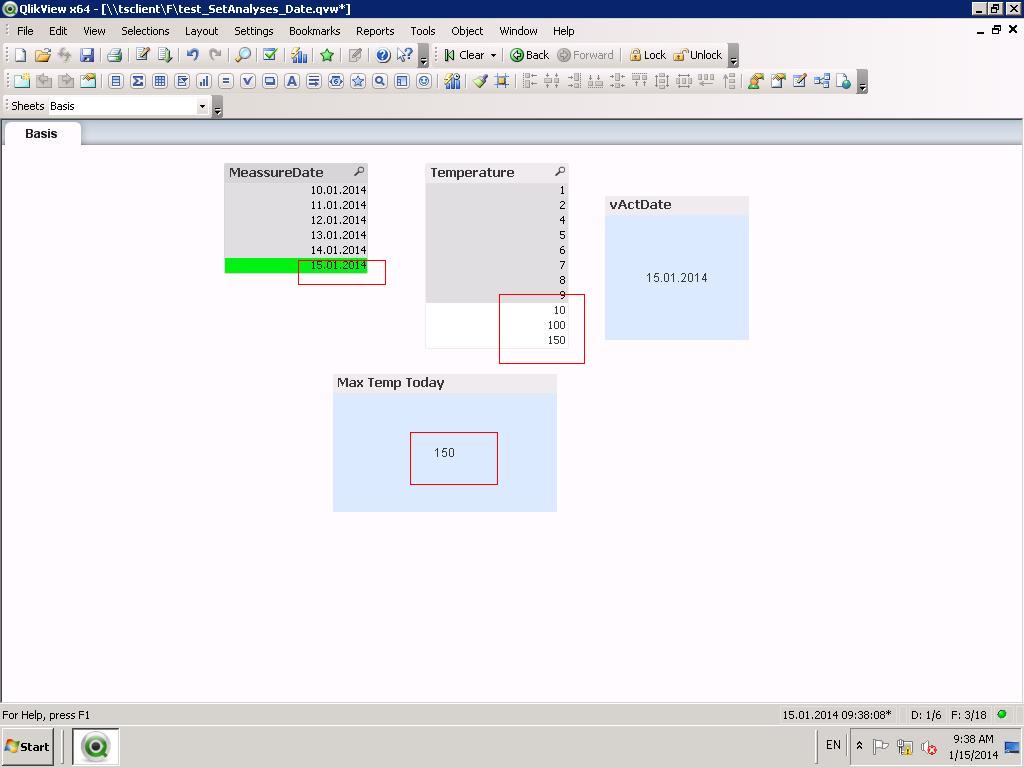
i tried your example file. But it doesn´t work. I get a '-' as a result.
I put some new data (15.01.2014) into the inline table and load it.
No values for today.
I use QV 11.20 SR 5.
Thank you
Marcel
- Mark as New
- Bookmark
- Subscribe
- Mute
- Subscribe to RSS Feed
- Permalink
- Report Inappropriate Content
Hi Kiran,
yes, if a date is in the String, it works. But a variable doesn´t work.
Regards
Marcel
- Mark as New
- Bookmark
- Subscribe
- Mute
- Subscribe to RSS Feed
- Permalink
- Report Inappropriate Content
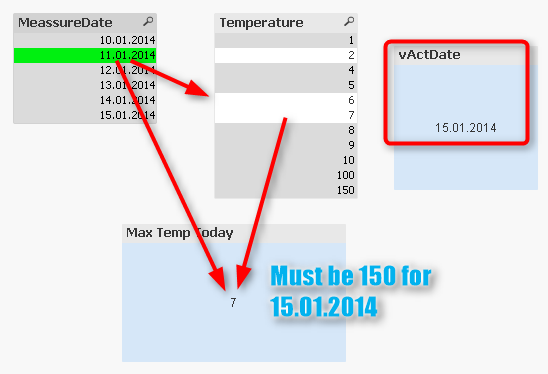
Thats my result. If I click on a date the max(value) of the date will be schowed.
But I want only the Max(value) of the Date in vActDate. 😞
- Mark as New
- Bookmark
- Subscribe
- Mute
- Subscribe to RSS Feed
- Permalink
- Report Inappropriate Content
Sorry, but
Max({$<MeassureDate={"$(vActDate)"}>}Temperature)
delivers no value(s).
nizamsha
- Mark as New
- Bookmark
- Subscribe
- Mute
- Subscribe to RSS Feed
- Permalink
- Report Inappropriate Content
PFA

 tanjavarwijk
- Mark as New
- Bookmark
- Subscribe
- Mute
- Subscribe to RSS Feed
- Permalink
- Report Inappropriate Content
Try
Max( {1<MeassureDate = {$(=#vActDate)}> Temperature)
- Mark as New
- Bookmark
- Subscribe
- Mute
- Subscribe to RSS Feed
- Permalink
- Report Inappropriate Content
Hi at all,
I think you all are right with your formula.
But now I found the error I made.
Nizam HM gave me an example which works as I needed. But copy the Formula into my QV-file, it doesn´t work.
So I take a deeper look on Nizams file.
In the Script I wrote
Set vActDate = Today()
This sets Today() into the variable. Not the Value. In a Textboxoutput you will get the Value. In a Formula it doesn´t work.
Nizam wrote:
Let vActDate = Today()
Let sets the value into the variable and so it works.
So I have to say thank you at all that gave me answers to this thread!
Thanks a lot.
Now I take the Formula:
Max( {1<MeassureDate = {"$(=Date (vActDate, 'DD.MM.YYYY'))"}>} Temperature)
Regards
Marcel
- « Previous Replies
- Next Replies »