Unlock a world of possibilities! Login now and discover the exclusive benefits awaiting you.

- Qlik Community
- :
- All Forums
- :
- QlikView
- :
- derived Dimension object
- Subscribe to RSS Feed
- Mark Topic as New
- Mark Topic as Read
- Float this Topic for Current User
- Bookmark
- Subscribe
- Mute
- Printer Friendly Page

- Mark as New
- Bookmark
- Subscribe
- Mute
- Subscribe to RSS Feed
- Permalink
- Report Inappropriate Content
derived Dimension object
Hi All,
I want to show Calculated Dimension values as Sales A,
Sales B ,
Sales C ,
Sales D as show shown in legend.
How to show?
Thanks in advance.
Accepted Solutions

 sunny_talwar
- Mark as New
- Bookmark
- Subscribe
- Mute
- Subscribe to RSS Feed
- Permalink
- Report Inappropriate Content
Is this what you are looking to get?
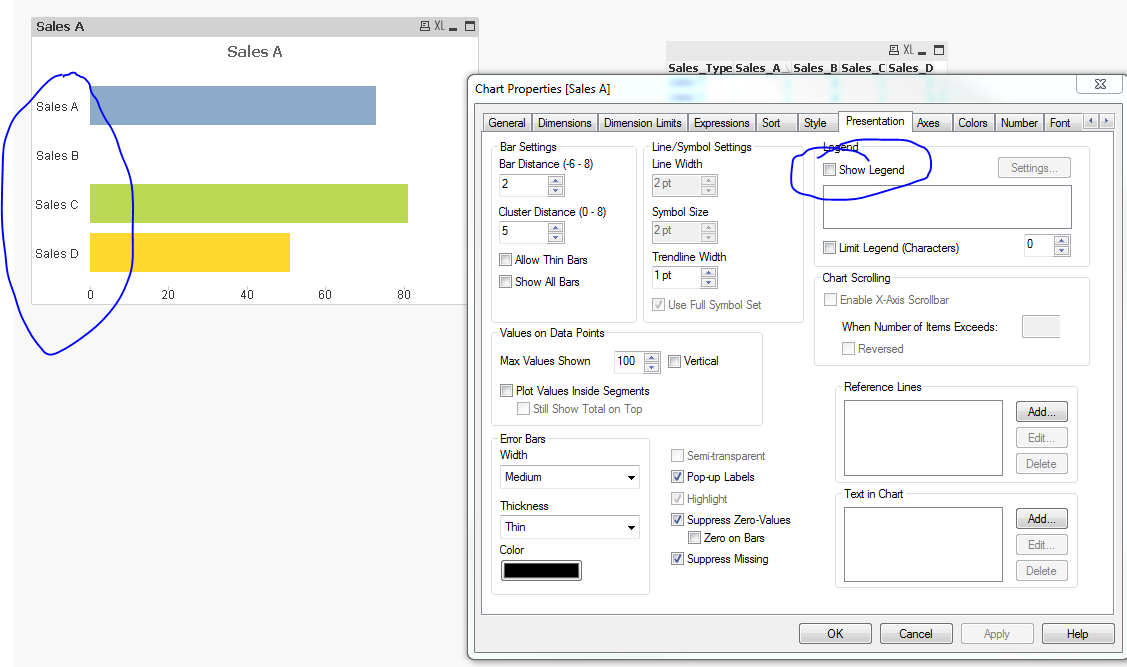
I unchecked the 'Show Legend' on the presentation tab to get the names on the axis
sunny_talwar
- Mark as New
- Bookmark
- Subscribe
- Mute
- Subscribe to RSS Feed
- Permalink
- Report Inappropriate Content
Is this what you are looking to get?
I unchecked the 'Show Legend' on the presentation tab to get the names on the axis

 jagan
jagan
- Mark as New
- Bookmark
- Subscribe
- Mute
- Subscribe to RSS Feed
- Permalink
- Report Inappropriate Content
HI,
Why can't you do crosstable() and use it as dimension.
CrossTable(SalesType, Sales)
LOAD Sales_Type,
Sales_A,
Sales_B,
Sales_C,
Sales_D
FROM
DATA.xls
(biff, embedded labels, table is Sheet1$);
Now use
Dimension: SalesType
Expression: Count({<Sales={'>0'}>}Sales_Type)
This way you don't need to write multiple expressions, in future if you get Sales_E for example, this will deal automatically, no need to change your app again.
Regards,
Jagan.