Unlock a world of possibilities! Login now and discover the exclusive benefits awaiting you.

- Qlik Community
- :
- All Forums
- :
- QlikView
- :
- Re: filter and table
- Subscribe to RSS Feed
- Mark Topic as New
- Mark Topic as Read
- Float this Topic for Current User
- Bookmark
- Subscribe
- Mute
- Printer Friendly Page

 souadouert
- Mark as New
- Bookmark
- Subscribe
- Mute
- Subscribe to RSS Feed
- Permalink
- Report Inappropriate Content
filter and table
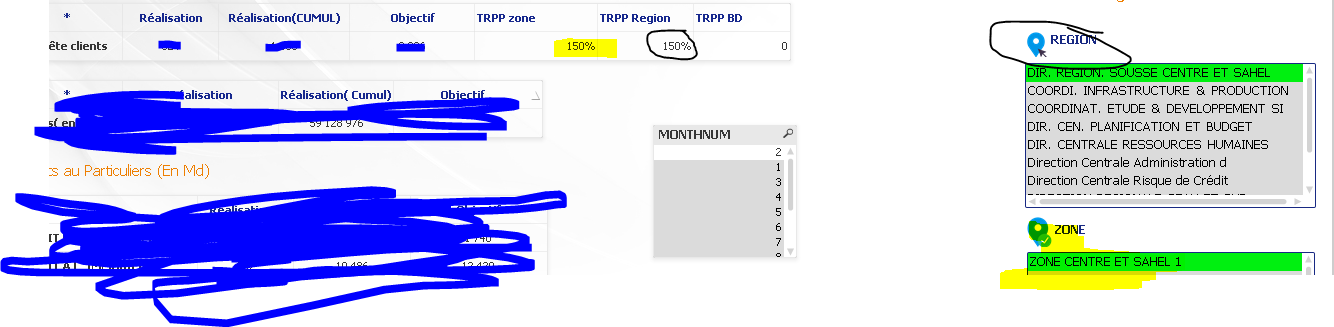
I have a region table(table Region ) containing several zone(table Zone ), and I need to display a table (measure = realization / objective) by zone and by region, the problem when I select the zone, the region measure just take the line of the zone selected, how can to eliminate the filter in the region measurement
- Tags:
- qlikview_scripting
Accepted Solutions
souadouert
- Mark as New
- Bookmark
- Subscribe
- Mute
- Subscribe to RSS Feed
- Permalink
- Report Inappropriate Content

 sunny_talwar
- Mark as New
- Bookmark
- Subscribe
- Mute
- Subscribe to RSS Feed
- Permalink
- Report Inappropriate Content
When you select Zone, Region gets selected automatically?
souadouert
- Mark as New
- Bookmark
- Subscribe
- Mute
- Subscribe to RSS Feed
- Permalink
- Report Inappropriate Content
No , first i have to select region after that Zone, because in the regions one finds the zones
sunny_talwar
- Mark as New
- Bookmark
- Subscribe
- Mute
- Subscribe to RSS Feed
- Permalink
- Report Inappropriate Content
So although you have selected a single region, you want to see all the regions that fall under a zone? May be set analysis like this
{<Region, Zone = p(Zone)>}
souadouert
- Mark as New
- Bookmark
- Subscribe
- Mute
- Subscribe to RSS Feed
- Permalink
- Report Inappropriate Content
the opossite all the zone that fall under a region 
souadouert
- Mark as New
- Bookmark
- Subscribe
- Mute
- Subscribe to RSS Feed
- Permalink
- Report Inappropriate Content
thank y sunny
{<Zone, Region = p(Region)>}
