Unlock a world of possibilities! Login now and discover the exclusive benefits awaiting you.

- Qlik Community
- :
- All Forums
- :
- QlikView
- :
- full cummulated sum script
- Subscribe to RSS Feed
- Mark Topic as New
- Mark Topic as Read
- Float this Topic for Current User
- Bookmark
- Subscribe
- Mute
- Printer Friendly Page

- Mark as New
- Bookmark
- Subscribe
- Mute
- Subscribe to RSS Feed
- Permalink
- Report Inappropriate Content
full cummulated sum script
Hi Guys,
how can I use the cummulative sum in script like in expression:
rangesum(above(Sum(Quantity),0,rowno()))
I need the cummulated sum as a fix number, that can calulated forward or backward ..
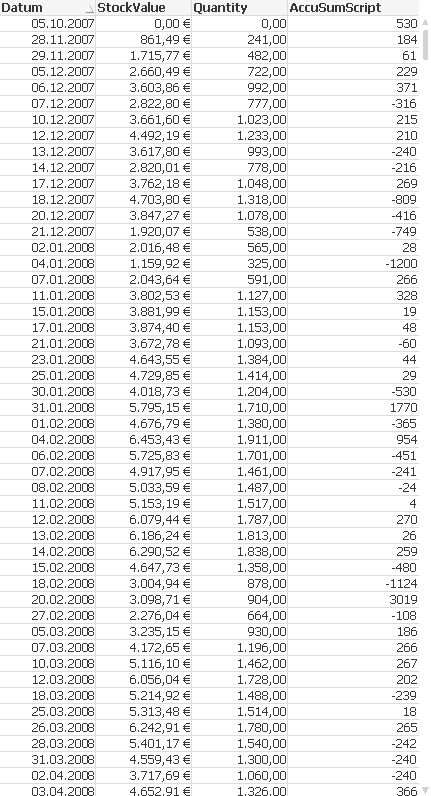
I tried with Rangesum(Quantity,peek('Quantity',-1) )as AccuSumScript; but it doesn't work
- « Previous Replies
-
- 1
- 2
- Next Replies »

 tresB
tresB
- Mark as New
- Bookmark
- Subscribe
- Mute
- Subscribe to RSS Feed
- Permalink
- Report Inappropriate Content
LOAD Articleno,
Date,
//StockValueAccuExp,
If(Articleno=Peek(Articleno),RangeSum(Peek(StockValueAccuExp), "sum[stockValue (aktual)])"), "sum[stockValue (aktual)])") as StockValueAccuExp,
"sum[stockValue (aktual)])",
//QuantityAccuExp,
If(Articleno=Peek(Articleno),RangeSum(Peek(QuantityAccuExp), [sum(Quantity)]), [sum(Quantity)]) as QuantityAccuExp,
[sum(Quantity)]
FROM
....
(biff, embedded labels, header is 2 lines, table is Sheet1$);
PFA
- Mark as New
- Bookmark
- Subscribe
- Mute
- Subscribe to RSS Feed
- Permalink
- Report Inappropriate Content
Now I get various values on each day, one of them is the right one. (excel result)
Because that in the sum(quantity) and sum(stockvalue ) from the excel, is sum into 1 value of each day..
but how can I sum that in script?
If I use sum(Quantity) or sum(stockvalue) in each if-conditions, = invalid expression error
- « Previous Replies
-
- 1
- 2
- Next Replies »