Unlock a world of possibilities! Login now and discover the exclusive benefits awaiting you.

- Qlik Community
- :
- All Forums
- :
- QlikView
- :
- gauge setting
- Subscribe to RSS Feed
- Mark Topic as New
- Mark Topic as Read
- Float this Topic for Current User
- Bookmark
- Subscribe
- Mute
- Printer Friendly Page

- Mark as New
- Bookmark
- Subscribe
- Mute
- Subscribe to RSS Feed
- Permalink
- Report Inappropriate Content
gauge setting
Hi
I want the variance between expense and forecast to be displayed in a guage .. when actuals is less than forecast want the needle to point to red
How can i get this working
Attached workbook
Thanks


- Mark as New
- Bookmark
- Subscribe
- Mute
- Subscribe to RSS Feed
- Permalink
- Report Inappropriate Content
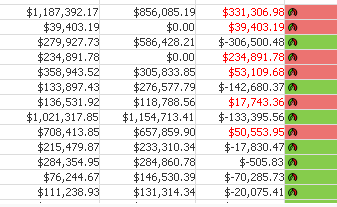
Like this?
- Mark as New
- Bookmark
- Subscribe
- Mute
- Subscribe to RSS Feed
- Permalink
- Report Inappropriate Content
No .. i want a separate gauge representing variance. Not in the chart ...
- Mark as New
- Bookmark
- Subscribe
- Mute
- Subscribe to RSS Feed
- Permalink
- Report Inappropriate Content
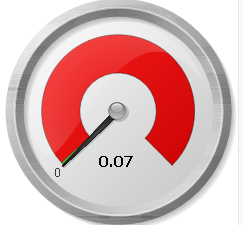
Like this?
- Mark as New
- Bookmark
- Subscribe
- Mute
- Subscribe to RSS Feed
- Permalink
- Report Inappropriate Content
yeah .. but when you select the months the variance is -4.1 which is in green , and for march its red(9%) can we do same in guage chart? .. red and green are based on Actual < Forecast = Green , else red
- Mark as New
- Bookmark
- Subscribe
- Mute
- Subscribe to RSS Feed
- Permalink
- Report Inappropriate Content
You have to use these conditions in your Segment Lower Bounds. try from your end?
=If((Sum(Amount)-Sum(ForecastAmount))/sum(Amount) < 0.4, Green(), If((Sum(Amount)-Sum(ForecastAmount))/sum(Amount) <0.9, Red(), Yellow()))
- Mark as New
- Bookmark
- Subscribe
- Mute
- Subscribe to RSS Feed
- Permalink
- Report Inappropriate Content
It does not display as expected .. can you please take a look .. this is the first time i am creating a guage chart
- Mark as New
- Bookmark
- Subscribe
- Mute
- Subscribe to RSS Feed
- Permalink
- Report Inappropriate Content
Sure, Here you go some play around the settings
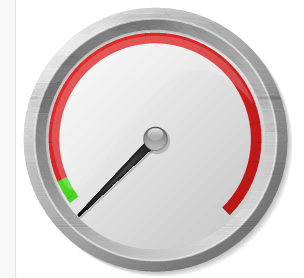
Note - Please mark helpful and Flag correct answer if you got solution. That may offer you in details
- Mark as New
- Bookmark
- Subscribe
- Mute
- Subscribe to RSS Feed
- Permalink
- Report Inappropriate Content
Thank you for trying .. but it does not reflect the filter selections.