Unlock a world of possibilities! Login now and discover the exclusive benefits awaiting you.

- Qlik Community
- :
- All Forums
- :
- QlikView
- :
- Execute Command with variable
- Subscribe to RSS Feed
- Mark Topic as New
- Mark Topic as Read
- Float this Topic for Current User
- Bookmark
- Subscribe
- Mute
- Printer Friendly Page

 lawrance
- Mark as New
- Bookmark
- Subscribe
- Mute
- Subscribe to RSS Feed
- Permalink
- Report Inappropriate Content
Execute Command with variable
Hi all,
I try to delete the CSV files in particular folder using Execute command but it is not deleting.
The following scenarios which I tried,
S1:
EXECUTE CMD.EXE /C del "$(v_Fldr_MTR_RDG_CSV)COMED_MTR_RDG_*.csv";
EXIT Script;
S2:
EXECUTE CMD.EXE /C del "$(v_Fldr_MTR_RDG_CSV)COMED_MTR_RDG_*.csv";
EXIT Script;
S3:
EXECUTE CMD.EXE /C del "..\..\..\Shared\Shared_Common_Files\Static_Data\COMED_MTR_RDG_*.csv";
EXIT Script;
Also I have enabled the below options
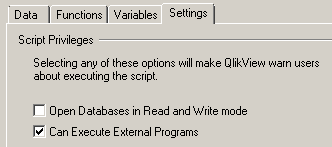
Note: The variable contains folder path location ..\..\..\Shared\Shared_Common_Files\Static_Data\
When I run the above script in QMC it is deleting.
Thanks,
Lawrance A
- « Previous Replies
-
- 1
- 2
- Next Replies »
Accepted Solutions

 BalaBhaskar_Qli
- Mark as New
- Bookmark
- Subscribe
- Mute
- Subscribe to RSS Feed
- Permalink
- Report Inappropriate Content
S1:
EXECUTE CMD.EXE /C del $(v_Fldr_MTR_RDG_CSV)"COMED_MTR_RDG_*.csv";
EXIT Script;

 Kushal_Chawda
- Mark as New
- Bookmark
- Subscribe
- Mute
- Subscribe to RSS Feed
- Permalink
- Report Inappropriate Content
have you tried checking this option in Setting->User preference


 RSvebeck
- Mark as New
- Bookmark
- Subscribe
- Mute
- Subscribe to RSS Feed
- Permalink
- Report Inappropriate Content
Same user running the qmc service as when you are running QV Desktop? If not, your user has perhaps not the correct file/folder access?
lawrance
- Mark as New
- Bookmark
- Subscribe
- Mute
- Subscribe to RSS Feed
- Permalink
- Report Inappropriate Content
Hi Chawda,
Yes, It is in enabled state but not working
Thanks,
Lawrance A
lawrance
- Mark as New
- Bookmark
- Subscribe
- Mute
- Subscribe to RSS Feed
- Permalink
- Report Inappropriate Content
Hi Svebeck,
Here I missed one thing.
If I give full path without storing variable and without using ..\..\..\Share\
For Example,
I got output when using below mentioned script but I need to do in variable
EXECUTE CMD.EXE /C del "E:\Source\Shared\Shared_Common_Files\Static_Data\COMED_MTR_RDG_*.csv";
EXIT Script;
Thanks,
Lawrance A

 vishsaggi
- Mark as New
- Bookmark
- Subscribe
- Mute
- Subscribe to RSS Feed
- Permalink
- Report Inappropriate Content
Did you try this: I mean without Quotes while reading from variable. And is your E a shared drive or a local drive on the server. IF it is a shared drive you might have to use actual drive name like \\sharedfile\Source\......; some thing like this.
SET v_Fldr_MTR_RDG_CSV = 'E:\Source\Shared\Shared_Common_Files\Static_Data\';
EXECUTE CMD.EXE /C del $(v_Fldr_MTR_RDG_CSV)COMED_MTR_RDG_*.csv;
EXIT Script;
lawrance
- Mark as New
- Bookmark
- Subscribe
- Mute
- Subscribe to RSS Feed
- Permalink
- Report Inappropriate Content
Hi,
I have tried but in Variable overview not in Script.
Thanks,
Lawrance A
BalaBhaskar_Qli- Mark as New
- Bookmark
- Subscribe
- Mute
- Subscribe to RSS Feed
- Permalink
- Report Inappropriate Content
S1:
EXECUTE CMD.EXE /C del $(v_Fldr_MTR_RDG_CSV)"COMED_MTR_RDG_*.csv";
EXIT Script;
vishsaggi
- Mark as New
- Bookmark
- Subscribe
- Mute
- Subscribe to RSS Feed
- Permalink
- Report Inappropriate Content
Does not matter did you give a try ? Is it still not working?
lawrance
- Mark as New
- Bookmark
- Subscribe
- Mute
- Subscribe to RSS Feed
- Permalink
- Report Inappropriate Content
Hi Bhaskar,
Thanks for your response.
I got the output which which I'm expected.
I have tried below scenario and got output.
Script:
EXECUTE CMD.EXE /C del $(v_Fldr_MTR_RDG_CSV)"COMED_MTR_RDG_*.csv";
EXIT Script;
Also update the variable in variable overview.
v_Fldr_MTR_RDG_CSV = E:\Source\Shared\Shared_Common_Files\Static_Data\
Now, it is working fine.
Thanks for all your reply.
Thanks,
Lawrance A

- « Previous Replies
-
- 1
- 2
- Next Replies »