Unlock a world of possibilities! Login now and discover the exclusive benefits awaiting you.

- Qlik Community
- :
- All Forums
- :
- QlikView
- :
- Re: hiding expression
- Subscribe to RSS Feed
- Mark Topic as New
- Mark Topic as Read
- Float this Topic for Current User
- Bookmark
- Subscribe
- Mute
- Printer Friendly Page

 souadouert
- Mark as New
- Bookmark
- Subscribe
- Mute
- Subscribe to RSS Feed
- Permalink
- Report Inappropriate Content
hiding expression
Is that I can hide an expression from a simple table depending on the value eg if an exp <100 I do not want to display it
- Tags:
- qlikview_scripting
- « Previous Replies
-
- 1
- 2
- Next Replies »
Accepted Solutions

 sunny_talwar
- Mark as New
- Bookmark
- Subscribe
- Mute
- Subscribe to RSS Feed
- Permalink
- Report Inappropriate Content
Use a hide show condition for each of your expression
Expression 1 -> Exp1 < 70
Expression 2 -> Exp2 < 70
Expression 3 -> Exp3 < 70
Expression 4 -> Exp4 < 70
Expression 5 -> Exp5 < 70
sunny_talwar
- Mark as New
- Bookmark
- Subscribe
- Mute
- Subscribe to RSS Feed
- Permalink
- Report Inappropriate Content
You can use an if statement for all your expressions to force them to be null when exp <100... So say you have 3 expressions and you want to show only when exp3 >= 100, you would do this
If(exp3 >= 100, exp1)
If(exp3 >= 100, exp2)
If(exp3 >= 100, exp3)
souadouert
- Mark as New
- Bookmark
- Subscribe
- Mute
- Subscribe to RSS Feed
- Permalink
- Report Inappropriate Content
i use this exp and then have this table
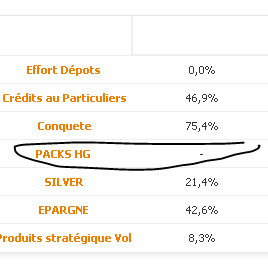
but i want delete the whole line
sunny_talwar
- Mark as New
- Bookmark
- Subscribe
- Mute
- Subscribe to RSS Feed
- Permalink
- Report Inappropriate Content
You just don't want to see this expression? Are you expecting to see only one value for each expression?
souadouert
- Mark as New
- Bookmark
- Subscribe
- Mute
- Subscribe to RSS Feed
- Permalink
- Report Inappropriate Content
If expression has a value for example <100 I display the line otherwise I hide all the expression
sunny_talwar
- Mark as New
- Bookmark
- Subscribe
- Mute
- Subscribe to RSS Feed
- Permalink
- Report Inappropriate Content
I am confused Souad...
souadouert
- Mark as New
- Bookmark
- Subscribe
- Mute
- Subscribe to RSS Feed
- Permalink
- Report Inappropriate Content
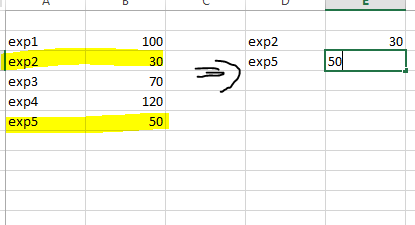
exemple i want show only exp <70
sunny_talwar
- Mark as New
- Bookmark
- Subscribe
- Mute
- Subscribe to RSS Feed
- Permalink
- Report Inappropriate Content
Use a hide show condition for each of your expression
Expression 1 -> Exp1 < 70
Expression 2 -> Exp2 < 70
Expression 3 -> Exp3 < 70
Expression 4 -> Exp4 < 70
Expression 5 -> Exp5 < 70

- Mark as New
- Bookmark
- Subscribe
- Mute
- Subscribe to RSS Feed
- Permalink
- Report Inappropriate Content
You could also try using Dimension Limits
souadouert
- Mark as New
- Bookmark
- Subscribe
- Mute
- Subscribe to RSS Feed
- Permalink
- Report Inappropriate Content
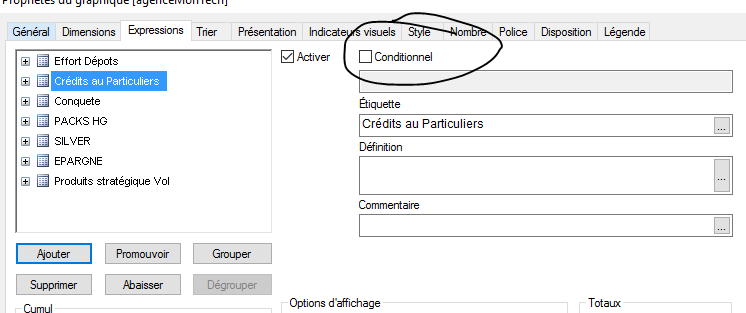
y mean this option
- « Previous Replies
-
- 1
- 2
- Next Replies »