Unlock a world of possibilities! Login now and discover the exclusive benefits awaiting you.

- Qlik Community
- :
- All Forums
- :
- QlikView
- :
- how to format
- Subscribe to RSS Feed
- Mark Topic as New
- Mark Topic as Read
- Float this Topic for Current User
- Bookmark
- Subscribe
- Mute
- Printer Friendly Page

- Mark as New
- Bookmark
- Subscribe
- Mute
- Subscribe to RSS Feed
- Permalink
- Report Inappropriate Content
how to format
Hi Everyone
I have data in text file in following format in straight line one after another.
Administrators
user1
user2
user4
user5
Remote Desktop Users
user5
user8
user3
how can i change via QlikView ETL so it becomes in following format.
Administrator Remote Desktop Users
user1 user5
user2 user8
user4 user3
user5

 MarcoWedel
- Mark as New
- Bookmark
- Subscribe
- Mute
- Subscribe to RSS Feed
- Permalink
- Report Inappropriate Content
Hi,
one possible solution:
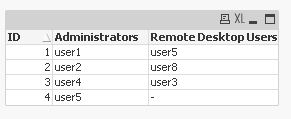
tabTextFile:
LOAD *,
    If(Match(Line, 'Administrators', 'Remote Desktop Users'), Line, Peek(Type)) as Type
Inline [
Line
Administrators
    user1
    user2
    user4
    user5


Remote Desktop Users
    user5
    user8
    user3
];

tabOutput:
Generic LOAD
  AutoNumber(RecNo(), Type) as ID,
  Type,
  Line
Resident tabTextFile
Where Type<>Line;
hope this helps
regards
Marco

 nagaiank
- Mark as New
- Bookmark
- Subscribe
- Mute
- Subscribe to RSS Feed
- Permalink
- Report Inappropriate Content
The following script also works:
A:
LOAD RowNo() as ID, * Inline [
Admin
user1
user2
user3
user4
];
B:
LOAD RowNo() as ID, * Inline [
User
user5
user6
user7
];
left Join (A) LOAD * Resident B;
DROP Table B;