Unlock a world of possibilities! Login now and discover the exclusive benefits awaiting you.

- Qlik Community
- :
- All Forums
- :
- QlikView
- :
- Re: how to get date format
- Subscribe to RSS Feed
- Mark Topic as New
- Mark Topic as Read
- Float this Topic for Current User
- Bookmark
- Subscribe
- Mute
- Printer Friendly Page

 sannidhikumar
- Mark as New
- Bookmark
- Subscribe
- Mute
- Subscribe to RSS Feed
- Permalink
- Report Inappropriate Content
how to get date format
Hi All ,
how to get date format .
and i am using this date(date#([Due Date],'DD-MMM-YYYY'),'MMM-YYYY') AS MonthYear1 not getting correct
output.
to Ex: Jan-2017
thanks ,

 kamal_sanguri
- Mark as New
- Bookmark
- Subscribe
- Mute
- Subscribe to RSS Feed
- Permalink
- Report Inappropriate Content
ok use,
=Date(Date#([Due Date],'YYYY-MM-DD'),'MMM-YYYY')
 qlikview979
- Mark as New
- Bookmark
- Subscribe
- Mute
- Subscribe to RSS Feed
- Permalink
- Report Inappropriate Content
Try like this
Date(Date#(Date#([Due Date]),'DD-MMM-YYYY'),'MMM-YYYY')
sannidhikumar
- Mark as New
- Bookmark
- Subscribe
- Mute
- Subscribe to RSS Feed
- Permalink
- Report Inappropriate Content
if i am using this field getting empty.
qlikview979
- Mark as New
- Bookmark
- Subscribe
- Mute
- Subscribe to RSS Feed
- Permalink
- Report Inappropriate Content
Hi Pradeep,
Take [ Due Date] list box,check there how data is coming.it means its coming left side or right side.if you getting left side use first like
Date#([Due Date])
kamal_sanguri
- Mark as New
- Bookmark
- Subscribe
- Mute
- Subscribe to RSS Feed
- Permalink
- Report Inappropriate Content
I am hoping you are trying to do this( is this your original question) ?
kamal_sanguri
- Mark as New
- Bookmark
- Subscribe
- Mute
- Subscribe to RSS Feed
- Permalink
- Report Inappropriate Content
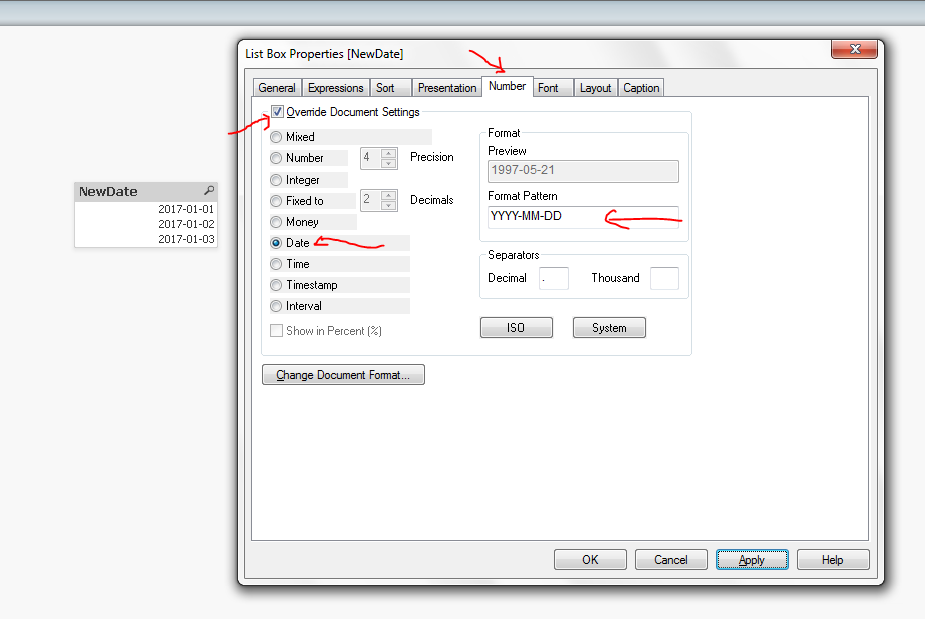
Aha, I think I misundertood, you wanted to say that you want new date in YYYY-MM-DD format.
=Date(Date#([Due Date],'DD-MM-YYYY'),'YYYY-MM-DD')
This should work.
sannidhikumar
- Mark as New
- Bookmark
- Subscribe
- Mute
- Subscribe to RSS Feed
- Permalink
- Report Inappropriate Content
kamal ,
after using that i got that this .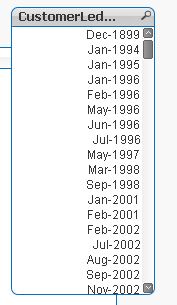
 shanky1907
- Mark as New
- Bookmark
- Subscribe
- Mute
- Subscribe to RSS Feed
- Permalink
- Report Inappropriate Content
Please use this:
=Date(Date#([Due Date],'YYYY-MM-DD'),'MMM-YY')
qlikview979
- Mark as New
- Bookmark
- Subscribe
- Mute
- Subscribe to RSS Feed
- Permalink
- Report Inappropriate Content
if its possible please share 2 records of data,you will get output with in short period of time.
kamal_sanguri
- Mark as New
- Bookmark
- Subscribe
- Mute
- Subscribe to RSS Feed
- Permalink
- Report Inappropriate Content
Follow this.