Unlock a world of possibilities! Login now and discover the exclusive benefits awaiting you.

- Qlik Community
- :
- All Forums
- :
- QlikView
- :
- Re: list box
- Subscribe to RSS Feed
- Mark Topic as New
- Mark Topic as Read
- Float this Topic for Current User
- Bookmark
- Subscribe
- Mute
- Printer Friendly Page

 mario-sarkis
- Mark as New
- Bookmark
- Subscribe
- Mute
- Subscribe to RSS Feed
- Permalink
- Report Inappropriate Content
list box
Hey All
A question to ask is :
is it possible to show a list box without it scrollbar ?
i need to show exactly like transparent text objiect look for example for list contain the id and the name want to look exactly like this if is it possible :
12586_Mario
12536_Rony
25362_Tony
Thank you,
- Tags:
- new_to_qlikview

 Clever_Anjos
- Mark as New
- Bookmark
- Subscribe
- Mute
- Subscribe to RSS Feed
- Permalink
- Report Inappropriate Content
Caption Tab, uncheck "Show Caption"
Layout Tab, reduce Border Width to 0 px

 buzzy996
- Mark as New
- Bookmark
- Subscribe
- Mute
- Subscribe to RSS Feed
- Permalink
- Report Inappropriate Content
are looking for tis?,use expression in ur list box insted of field.
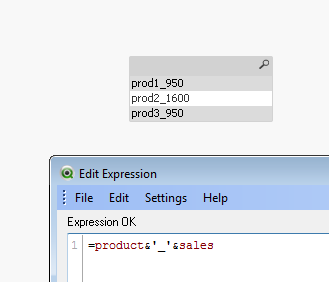
mario-sarkis
- Mark as New
- Bookmark
- Subscribe
- Mute
- Subscribe to RSS Feed
- Permalink
- Report Inappropriate Content
oh Great Clever but the problem is the scrollbar still show is it possible to remove it in a List Box?
Clever_Anjos
- Mark as New
- Bookmark
- Subscribe
- Mute
- Subscribe to RSS Feed
- Permalink
- Report Inappropriate Content
What you want to show when there are more values than the window?
mario-sarkis
- Mark as New
- Bookmark
- Subscribe
- Mute
- Subscribe to RSS Feed
- Permalink
- Report Inappropriate Content
Actualy the list box that i need to show is for reading only and it will disappear if no entry data in a input box so the user cannot select on it or choose a field but as long as the scrollbar appear the user can scroll it down .
Can You help ?

- Mark as New
- Bookmark
- Subscribe
- Mute
- Subscribe to RSS Feed
- Permalink
- Report Inappropriate Content
Maybe you need a text box not a list box for this purpose.
Clever_Anjos
- Mark as New
- Bookmark
- Subscribe
- Mute
- Subscribe to RSS Feed
- Permalink
- Report Inappropriate Content
Please add a text box with this expression
=CONCAT (idField & '- ' & valueField, CHR(10))
Uncheck Vertical Scrollbar