Unlock a world of possibilities! Login now and discover the exclusive benefits awaiting you.

- Qlik Community
- :
- All Forums
- :
- QlikView
- :
- make length suitable for straight table
- Subscribe to RSS Feed
- Mark Topic as New
- Mark Topic as Read
- Float this Topic for Current User
- Bookmark
- Subscribe
- Mute
- Printer Friendly Page

- Mark as New
- Bookmark
- Subscribe
- Mute
- Subscribe to RSS Feed
- Permalink
- Report Inappropriate Content
make length suitable for straight table
Hello,
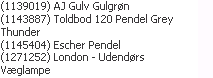
i have a straight table with with productnames.
The problem is that some of the products is too long, so they are on a secondline.
Also a problem is that serveral customers has different lenghts on their productnames.
How do i best fit my straight table so there will be only one line?
My expression is :
=Concat(DimItem.ProductName,chr(10))
I have attached an example
- « Previous Replies
-
- 1
- 2
- Next Replies »
- Mark as New
- Bookmark
- Subscribe
- Mute
- Subscribe to RSS Feed
- Permalink
- Report Inappropriate Content
one more questions
If i have a productname like this in a bar chart:
(3489u9343) Mhahahaasds
How do i split the text up after last )
So in the bar chart it would be
(3489u9343)
Mhahahaasds

 marcus_sommer
- Mark as New
- Bookmark
- Subscribe
- Mute
- Subscribe to RSS Feed
- Permalink
- Report Inappropriate Content
Straight Table: disable multiline values in presentation tab
Bar Chart: subfield(product, ' )', 1) & chr(10) & subfield(product, ' )', 2) or another string-functions like mid/left/right/index ...
- Marcus
- Mark as New
- Bookmark
- Subscribe
- Mute
- Subscribe to RSS Feed
- Permalink
- Report Inappropriate Content
the problem is my multiline is set to like 40 lines ( so im sure to get all lines broken down) If i disabled it, i will get 40 products on line like this:
(3489u9343) Mhahahaasds (3489u9343)2 Mhahahaasds (3489u9343)3 Mhahahaasds
And thats not how i want it.
It want it to be:
(3489u9343) Mhahahaasds
(3489u9343) Mhahahaasds2
(3489u9343) Mhahahaasds3
(3489u9343) Mhahahaasds4
and not
(3489u9343)
Mhahahaasds
in my straight table.
But in my bar chart i want:
(3489u9343)
Mhahahaasds
- Mark as New
- Bookmark
- Subscribe
- Mute
- Subscribe to RSS Feed
- Permalink
- Report Inappropriate Content
if i use subfield 1, i get all the ids which is correct and if use 2 i get all the names, but i does not make two lines even though i use chr(13)
marcus_sommer
- Mark as New
- Bookmark
- Subscribe
- Mute
- Subscribe to RSS Feed
- Permalink
- Report Inappropriate Content
For me is this not really clear ... best will be you post a small example.
- Marcus
- Mark as New
- Bookmark
- Subscribe
- Mute
- Subscribe to RSS Feed
- Permalink
- Report Inappropriate Content
i have posted an document.
marcus_sommer
- Mark as New
- Bookmark
- Subscribe
- Mute
- Subscribe to RSS Feed
- Permalink
- Report Inappropriate Content
Perhaps it fit so better ... sometimes are not all requirements simultaneously possible and it should be defined the main-needs ...
- Marcus

 nicolai_moller
- Mark as New
- Bookmark
- Subscribe
- Mute
- Subscribe to RSS Feed
- Permalink
- Report Inappropriate Content
Hov hov. Lav dine lektier selv 
- Mark as New
- Bookmark
- Subscribe
- Mute
- Subscribe to RSS Feed
- Permalink
- Report Inappropriate Content
Thanks why did you do to the bar chart? I can see that you added Text in chart expression. But how did you get it down from the top?
The straight table aint working as i need, cause i need it to be on another dimension, but thanks anyways i think i have come up with another solution there.
- « Previous Replies
-
- 1
- 2
- Next Replies »