Unlock a world of possibilities! Login now and discover the exclusive benefits awaiting you.

- Qlik Community
- :
- All Forums
- :
- QlikView
- :
- max
- Subscribe to RSS Feed
- Mark Topic as New
- Mark Topic as Read
- Float this Topic for Current User
- Bookmark
- Subscribe
- Mute
- Printer Friendly Page

 smilingjohn
- Mark as New
- Bookmark
- Subscribe
- Mute
- Subscribe to RSS Feed
- Permalink
- Report Inappropriate Content
max
HI all ,
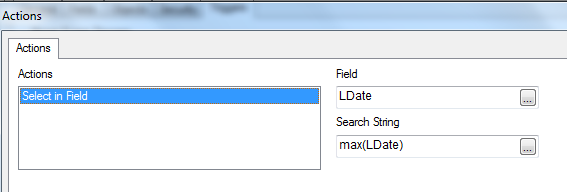
I want to set a trigget upon active sheet ...
But this is not working
I want to sleect the max date ..
How do we do this ?
and also i have a table ...in which i have sorted like below ...
this will not list properly if i clear the selections
Match(Cutomers,'17.7','17.8','17.8','17.9','17.10','17.11','17.12')
this order shoul remain constant even if clear everything
please do suggest
Thanks in advace
Accepted Solutions

 tresB
tresB
- Mark as New
- Bookmark
- Subscribe
- Mute
- Subscribe to RSS Feed
- Permalink
- Report Inappropriate Content
Try a formatting your max date. Try like: =Date(Max(LDate), 'ldateformathere') // '=' sign is needed in search string
For other query, try exp:
=Only({1}Match(Cutomers,'17.7','17.8','17.8','17.9','17.10','17.11','17.12'))
and/or
uncheck 'State' from Sort By in Sort tab.

 kusumanchir
- Mark as New
- Bookmark
- Subscribe
- Mute
- Subscribe to RSS Feed
- Permalink
- Report Inappropriate Content
Hi John,
The search string should be prefixed with '=' because '=Max(LDate)' is an expression.
Regards,
Rasly.K
tresB
- Mark as New
- Bookmark
- Subscribe
- Mute
- Subscribe to RSS Feed
- Permalink
- Report Inappropriate Content
Try a formatting your max date. Try like: =Date(Max(LDate), 'ldateformathere') // '=' sign is needed in search string
For other query, try exp:
=Only({1}Match(Cutomers,'17.7','17.8','17.8','17.9','17.10','17.11','17.12'))
and/or
uncheck 'State' from Sort By in Sort tab.
