Unlock a world of possibilities! Login now and discover the exclusive benefits awaiting you.

- Qlik Community
- :
- All Forums
- :
- QlikView
- :
- Re: % measure
- Subscribe to RSS Feed
- Mark Topic as New
- Mark Topic as Read
- Float this Topic for Current User
- Bookmark
- Subscribe
- Mute
- Printer Friendly Page

 master_student
- Mark as New
- Bookmark
- Subscribe
- Mute
- Subscribe to RSS Feed
- Permalink
- Report Inappropriate Content
% measure
Hello Community,
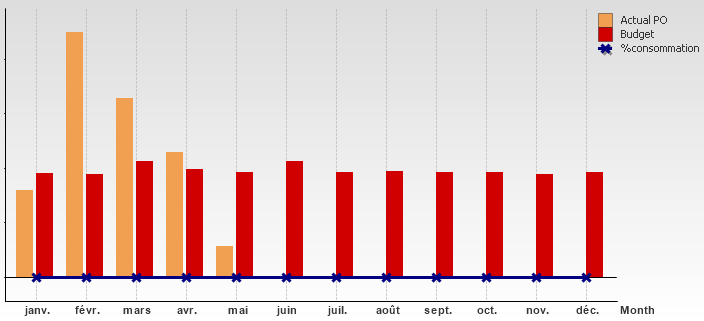
I have a graph with 2 measures as you can see bellow and I need to add another measure to calculate the % consumed of the budget
What is the formula?
Thanks for your help
Accepted Solutions

 sunny_talwar
- Mark as New
- Bookmark
- Subscribe
- Mute
- Subscribe to RSS Feed
- Permalink
- Report Inappropriate Content
I think you might want to move the third expression to the right axis as the budget and Actual PO might be huge values and the % might be too small to be visual on the same axis.
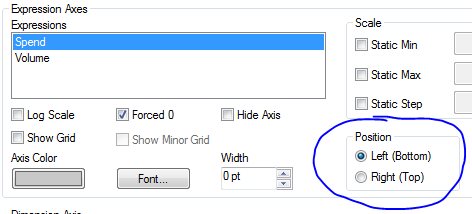
Pick your third expression from the Expressions above and select Right (Top) option

 swuehl
- Mark as New
- Bookmark
- Subscribe
- Mute
- Subscribe to RSS Feed
- Permalink
- Report Inappropriate Content
Maybe like
= Column(1) / Column(2)
or
="Actual PO" / "Budget"
and setting the number format on number tab to percentage.
sunny_talwar
- Mark as New
- Bookmark
- Subscribe
- Mute
- Subscribe to RSS Feed
- Permalink
- Report Inappropriate Content
I think you might want to move the third expression to the right axis as the budget and Actual PO might be huge values and the % might be too small to be visual on the same axis.
Pick your third expression from the Expressions above and select Right (Top) option
master_student
- Mark as New
- Bookmark
- Subscribe
- Mute
- Subscribe to RSS Feed
- Permalink
- Report Inappropriate Content
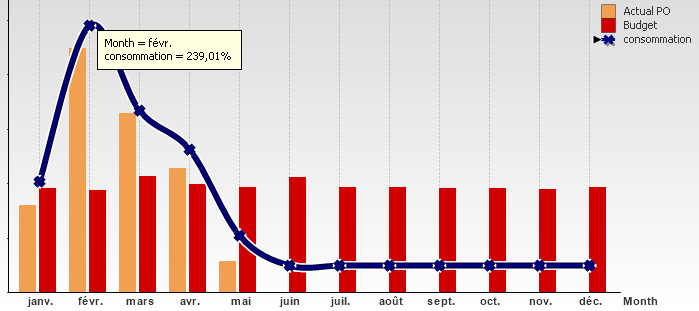
Thanks Sunny and Swuel. I combined your solutions and the result is :