Unlock a world of possibilities! Login now and discover the exclusive benefits awaiting you.

- Qlik Community
- :
- All Forums
- :
- QlikView
- :
- record counter
- Subscribe to RSS Feed
- Mark Topic as New
- Mark Topic as Read
- Float this Topic for Current User
- Bookmark
- Subscribe
- Mute
- Printer Friendly Page

- Mark as New
- Bookmark
- Subscribe
- Mute
- Subscribe to RSS Feed
- Permalink
- Report Inappropriate Content
record counter
Using record counter on keyfields in qlikview..can anyone explain me with example.

 rahulpawarb
- Mark as New
- Bookmark
- Subscribe
- Mute
- Subscribe to RSS Feed
- Permalink
- Report Inappropriate Content
Hello Sindhu,
Trust you are doing good!
RecNo() is a script function. This script functions returns an integer for the number of the currently read row of the current table. The first record is number 1.
Below is syntax:
RecNo() As RecordNo
In contrast to RowNo() function (It is a function which counts rows in the resulting QlikView table), RecNo(), counts the records in the raw data table and is reset when a raw data table is concatenated to another.
Example: Load script
Raw data table load:
Tab1:
LOAD * INLINE
[A, B
1, aa
2,cc
3,ee];
Tab2:
LOAD * INLINE
[C, D
5, xx
4,yy
6,zz];
Loading record and row numbers for selected rows:
QTab:
LOAD *,
RecNo( ),
RowNo( )
resident Tab1 where A<>2;
LOAD
C as A,
D as B,
RecNo( ),
RowNo( )
resident Tab2 where A<>5;
//We don't need the source tables anymore, so we drop them
Drop tables Tab1, Tab2;
The resulting QlikView internal table:
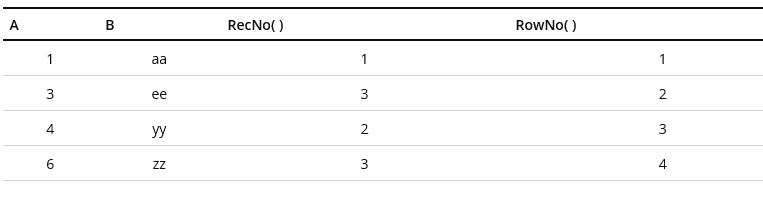
Reference:
Hope this will help.
Regards!
Rahul