Unlock a world of possibilities! Login now and discover the exclusive benefits awaiting you.

- Qlik Community
- :
- All Forums
- :
- QlikView
- :
- Re: rolling da
- Subscribe to RSS Feed
- Mark Topic as New
- Mark Topic as Read
- Float this Topic for Current User
- Bookmark
- Subscribe
- Mute
- Printer Friendly Page

 manoj217
- Mark as New
- Bookmark
- Subscribe
- Mute
- Subscribe to RSS Feed
- Permalink
- Report Inappropriate Content
rolling da
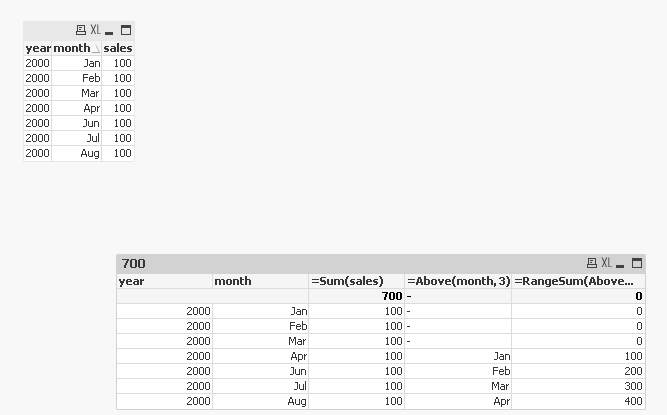
i have a straight table with month,year as dimension and sum(sales) as expression i want to create a rolling data like
Load * inline [year,month,sales
2000,jan,100
2000,feb,100
2000,mar,100
2000,apr,100
2000,jun,100
2000,ju;ly,100
2000,aug,100]
output:
year,month,sales,rollling month,rolling sales
2000,jan,100,
2000,feb,100,
2000,mar,100,
2000,apr,100, jan,100
2000,jun,100,feb,200
2000,ju;ly,100,mar,300
2000,aug,100,apr,400
how can i get the rolling data like this please suggest me

 sunny_talwar
- Mark as New
- Bookmark
- Subscribe
- Mute
- Subscribe to RSS Feed
- Permalink
- Report Inappropriate Content
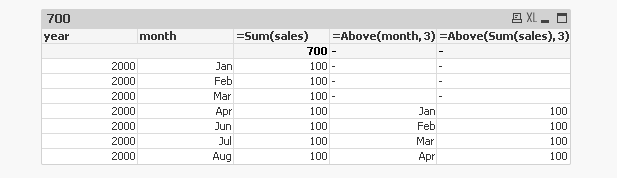
Use Above() function here
sunny_talwar
- Mark as New
- Bookmark
- Subscribe
- Mute
- Subscribe to RSS Feed
- Permalink
- Report Inappropriate Content
Change the second expression to this
=RangeSum(Above(Sum(sales), 3, RowNo()))