Unlock a world of possibilities! Login now and discover the exclusive benefits awaiting you.

- Qlik Community
- :
- All Forums
- :
- QlikView
- :
- Re: scroll bar limit
- Subscribe to RSS Feed
- Mark Topic as New
- Mark Topic as Read
- Float this Topic for Current User
- Bookmark
- Subscribe
- Mute
- Printer Friendly Page

- Mark as New
- Bookmark
- Subscribe
- Mute
- Subscribe to RSS Feed
- Permalink
- Report Inappropriate Content
scroll bar limit
Hi,
I've got a scroll bar with date values ('MM-YYYY'). The data is showing the all values in that field. I'd like to limit the shown months. So let's say I'd like to have all values of the 12 months (=last 12 values).
Can anybody help me? With bar Charts it's easy to get the last 12 values, but what about scroll bars?
Cheers,
Tobi
- Tags:
- new_to_qlikview
Accepted Solutions

 rubenmarin
- Mark as New
- Bookmark
- Subscribe
- Mute
- Subscribe to RSS Feed
- Permalink
- Report Inappropriate Content
Hi Tobias, you're right that doesn't works when you select a date, I didn't tested, try with a simpler:
=If(OrderDate>AddMonths(Max(TOTAL {1} OrderDate), -12), OrderDate)

 buzzy996
- Mark as New
- Bookmark
- Subscribe
- Mute
- Subscribe to RSS Feed
- Permalink
- Report Inappropriate Content
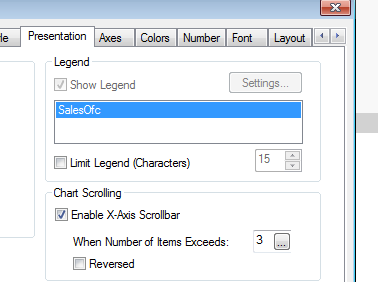
try this way,by using expression u can get last 12 values and we can also control if u need some thing from scroll bar..see below.
- Mark as New
- Bookmark
- Subscribe
- Mute
- Subscribe to RSS Feed
- Permalink
- Report Inappropriate Content
Thanks, but that's not what I'm looking for.
With scroll bar I mean something like that:

buzzy996
- Mark as New
- Bookmark
- Subscribe
- Mute
- Subscribe to RSS Feed
- Permalink
- Report Inappropriate Content
ok,can u try with the same expression as u said above u can diaply last 12 values in bar chart,use the same expression in slider object--general tab-Data-Field-select expression "place the same expression here."
rubenmarin
- Mark as New
- Bookmark
- Subscribe
- Mute
- Subscribe to RSS Feed
- Permalink
- Report Inappropriate Content
Hi Tobias, that's a slider, in it's properties, in the field list, the last option is <expression>, select that option and use an expression that filters the values you want to show, ie:
=Aggr(If(DateField>AddMonths(Max(TOTAL {1} DateField), -12), DateField), DateField)
- Mark as New
- Bookmark
- Subscribe
- Mute
- Subscribe to RSS Feed
- Permalink
- Report Inappropriate Content
Thanks Ruben,
jep that's been what I'm looking for 
But the expression is not the right one.. Any other suggestions?
buzzy996
- Mark as New
- Bookmark
- Subscribe
- Mute
- Subscribe to RSS Feed
- Permalink
- Report Inappropriate Content
can u share ur .qvw?
rubenmarin
- Mark as New
- Bookmark
- Subscribe
- Mute
- Subscribe to RSS Feed
- Permalink
- Report Inappropriate Content
Hi Tobias, you're right that doesn't works when you select a date, I didn't tested, try with a simpler:
=If(OrderDate>AddMonths(Max(TOTAL {1} OrderDate), -12), OrderDate)
- Mark as New
- Bookmark
- Subscribe
- Mute
- Subscribe to RSS Feed
- Permalink
- Report Inappropriate Content
Great, thanks Ruben.. Exactly what I looked for!