Unlock a world of possibilities! Login now and discover the exclusive benefits awaiting you.

Announcements
Talend Cloud AWS EU Scheduled Outage: Starting Tues 26 May 21:00 CEST with expected completion Wed 27 May 01:00 CEST
- Qlik Community
- :
- All Forums
- :
- QlikView
- :
- straight table
Options
- Subscribe to RSS Feed
- Mark Topic as New
- Mark Topic as Read
- Float this Topic for Current User
- Bookmark
- Subscribe
- Mute
- Printer Friendly Page
Turn on suggestions
Auto-suggest helps you quickly narrow down your search results by suggesting possible matches as you type.
Showing results for

 manoj217
Creator III
2018-03-14
05:00 AM
- Mark as New
- Bookmark
- Subscribe
- Mute
- Subscribe to RSS Feed
- Permalink
- Report Inappropriate Content
straight table
Hi All,
I have a straight table consisting of 15 dimensions and measures , I have taken one expression as =Field name.
Data will be like this:
Dimension1, Dimension2,Dimension3,Measure(=Field name)
a,x,1,100
b,y,2,100
c,z,3,200
a,x,2,100
in this above condition its works fine but if I omit Dimension3 it has to show like this.
Dimension1, Dimension2,Measure(=Field name)
a,x,100
b,y,100
c,z,,200
a,x,100
but it is showing
a,x,100
b,y,100
c,z,,200
1,612 Views
- « Previous Replies
-
- 1
- 2
- Next Replies »
11 Replies

 Nagaraju_KCS
Specialist III
2018-03-14
05:39 AM
- Mark as New
- Bookmark
- Subscribe
- Mute
- Subscribe to RSS Feed
- Permalink
- Report Inappropriate Content
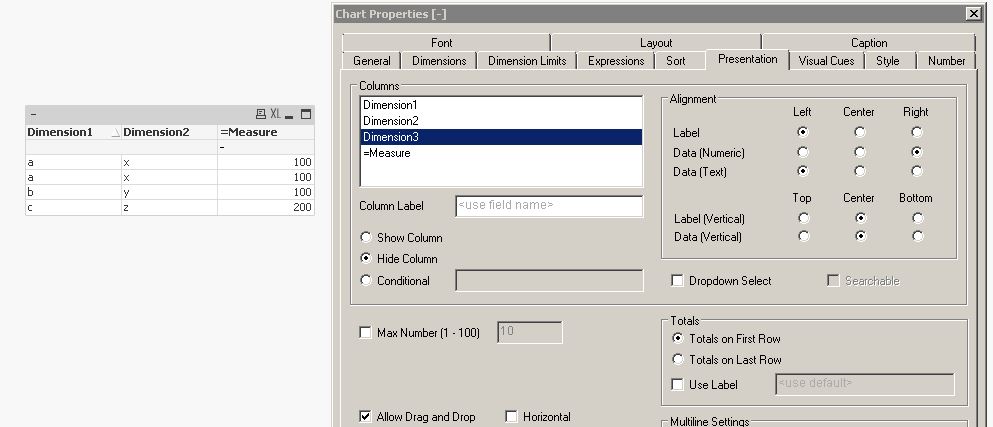
Roser, Hide columns should work in Straight table.
see below,
251 Views
 gerry_hdm
Creator II
2018-03-14
06:02 AM
- Mark as New
- Bookmark
- Subscribe
- Mute
- Subscribe to RSS Feed
- Permalink
- Report Inappropriate Content
Hello this a chart table
if understand you use a Table Box
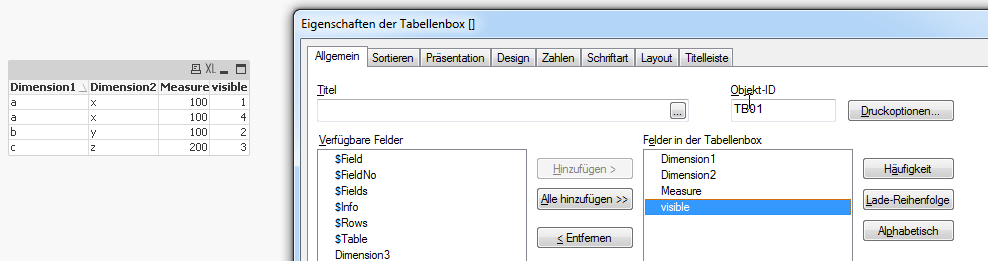
sorry
251 Views

- « Previous Replies
-
- 1
- 2
- Next Replies »