Unlock a world of possibilities! Login now and discover the exclusive benefits awaiting you.

- Qlik Community
- :
- All Forums
- :
- QlikView
- :
- straight table
- Subscribe to RSS Feed
- Mark Topic as New
- Mark Topic as Read
- Float this Topic for Current User
- Bookmark
- Subscribe
- Mute
- Printer Friendly Page

- Mark as New
- Bookmark
- Subscribe
- Mute
- Subscribe to RSS Feed
- Permalink
- Report Inappropriate Content
straight table
How can we hide fields in a straight table? and how come we cant hide fields in pivot table?
- Tags:
- new_to_qlikview
Accepted Solutions

 satishqlik
- Mark as New
- Bookmark
- Subscribe
- Mute
- Subscribe to RSS Feed
- Permalink
- Report Inappropriate Content
You can try only with str table
Chart properties>Presentation>select column and hide as per below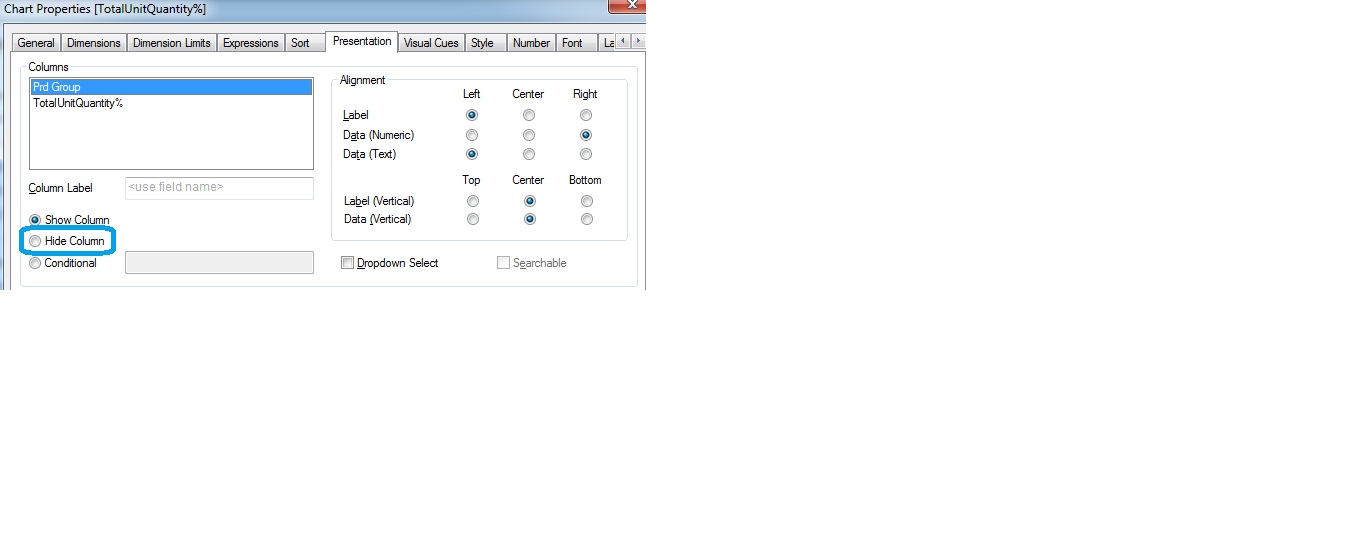

 petter
- Mark as New
- Bookmark
- Subscribe
- Mute
- Subscribe to RSS Feed
- Permalink
- Report Inappropriate Content
The straight table has a much simpler internal structure compared to the pivot table. It would pose some serious challenges giving the same freedom with pivot table.
- Mark as New
- Bookmark
- Subscribe
- Mute
- Subscribe to RSS Feed
- Permalink
- Report Inappropriate Content
Ok. thank you. Could you tell me how to hide a specific field in straight table (which is not possible in pivot table)?
satishqlik
- Mark as New
- Bookmark
- Subscribe
- Mute
- Subscribe to RSS Feed
- Permalink
- Report Inappropriate Content
You can try only with str table
Chart properties>Presentation>select column and hide as per below
petter
- Mark as New
- Bookmark
- Subscribe
- Mute
- Subscribe to RSS Feed
- Permalink
- Report Inappropriate Content
thats it 
 pratap6699
- Mark as New
- Bookmark
- Subscribe
- Mute
- Subscribe to RSS Feed
- Permalink
- Report Inappropriate Content
stirght table-->presentation-->select field-->hide colum option select....but there is no option in pivot table...this is also one of the difference between both tables but pivot is best for grouping and partial sums.....where loading time only we can hide the column...by using SET hideprefix='~';