Unlock a world of possibilities! Login now and discover the exclusive benefits awaiting you.

- Qlik Community
- :
- All Forums
- :
- QlikView
- :
- Re: strange behaviour
- Subscribe to RSS Feed
- Mark Topic as New
- Mark Topic as Read
- Float this Topic for Current User
- Bookmark
- Subscribe
- Mute
- Printer Friendly Page

 qlikviewwizard
- Mark as New
- Bookmark
- Subscribe
- Mute
- Subscribe to RSS Feed
- Permalink
- Report Inappropriate Content
strange behaviour
Hi All,
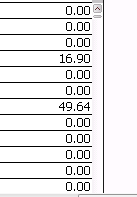
I want not to show the empty and zero values from the chart.
I checked suppress zero values and suppress null values. But it is not working. Version is 11.0 SR2 64bit
Please help me.
Accepted Solutions

 jagan
jagan
- Mark as New
- Bookmark
- Subscribe
- Mute
- Subscribe to RSS Feed
- Permalink
- Report Inappropriate Content
Try this expressions
if(Floor(sum(COMM)) <>0 , sum(COMM))
OR
if(Round(sum(COMM)) <>0 , sum(COMM))
Regards,
jagan.

 tamilarasu
- Mark as New
- Bookmark
- Subscribe
- Mute
- Subscribe to RSS Feed
- Permalink
- Report Inappropriate Content
Hi Arjun,
I could not see any null/blank values in your chart.



 sunny_talwar
- Mark as New
- Bookmark
- Subscribe
- Mute
- Subscribe to RSS Feed
- Permalink
- Report Inappropriate Content
I don't see it either

Can you post a screenshot of what you are seeing?
qlikviewwizard
- Mark as New
- Bookmark
- Subscribe
- Mute
- Subscribe to RSS Feed
- Permalink
- Report Inappropriate Content
jagan
- Mark as New
- Bookmark
- Subscribe
- Mute
- Subscribe to RSS Feed
- Permalink
- Report Inappropriate Content
Hi,
Check whether you have floating point numbers like 0.00054. If you have like this Use Floor()/Ceil()/Round().
Regards,
Jagan.
jagan
- Mark as New
- Bookmark
- Subscribe
- Mute
- Subscribe to RSS Feed
- Permalink
- Report Inappropriate Content
Note: 0 <> 0.0000345 or any other number.
Regards,
Jagan.
jagan
- Mark as New
- Bookmark
- Subscribe
- Mute
- Subscribe to RSS Feed
- Permalink
- Report Inappropriate Content
Try this expressions
if(Floor(sum(COMM)) <>0 , sum(COMM))
OR
if(Round(sum(COMM)) <>0 , sum(COMM))
Regards,
jagan.
