Unlock a world of possibilities! Login now and discover the exclusive benefits awaiting you.

- Qlik Community
- :
- All Forums
- :
- QlikView
- :
- Re: sum time values
- Subscribe to RSS Feed
- Mark Topic as New
- Mark Topic as Read
- Float this Topic for Current User
- Bookmark
- Subscribe
- Mute
- Printer Friendly Page

- Mark as New
- Bookmark
- Subscribe
- Mute
- Subscribe to RSS Feed
- Permalink
- Report Inappropriate Content
sum time values
hi,
i have feild that show time 1.36(1hour & 36 minute )
if i write in expression sum(feild1) the result is 5.44 (i have 4 line with that 1.36 )
how do i write to get the result in hour - 6.24 - 6 hour & 24 minute ?
thanks'
yarin.
- « Previous Replies
-
- 1
- 2
- Next Replies »
Accepted Solutions

 tresB
tresB
- Mark as New
- Bookmark
- Subscribe
- Mute
- Subscribe to RSS Feed
- Permalink
- Report Inappropriate Content
.png "sasikanth")
 sasikanth
- Mark as New
- Bookmark
- Subscribe
- Mute
- Subscribe to RSS Feed
- Permalink
- Report Inappropriate Content
hi,
can you explain a bit more what exactly you want to achieve?
if possible with a sample
 tamilarasu
- Mark as New
- Bookmark
- Subscribe
- Mute
- Subscribe to RSS Feed
- Permalink
- Report Inappropriate Content
Try,
=Time(sum(Num(Time#(FieldName,'hh:mm'))),'hh:mm')
If your hour and minute format is 06.30 then try below,
=Time(sum(Num(Time#(F1,'hh.mm'))),'hh.mm')
tresB
- Mark as New
- Bookmark
- Subscribe
- Mute
- Subscribe to RSS Feed
- Permalink
- Report Inappropriate Content
Try like:
=Time(Sum(Time#(Field, 'hh.mm')), 'hh:mm')

 MarcoWedel
- Mark as New
- Bookmark
- Subscribe
- Mute
- Subscribe to RSS Feed
- Permalink
- Report Inappropriate Content
Interval(Sum(field1)/24,'hh.mm')
 HirisH_V7
- Mark as New
- Bookmark
- Subscribe
- Mute
- Subscribe to RSS Feed
- Permalink
- Report Inappropriate Content
Hi,
Check this with your time field,
=time(num(time#('00:20', 'hh:mm')) + num(time#('00:30', 'hh:mm')) , 'hh:mm')
So, it may look like this for you:
=time(sum(num(time#(TIME,'hh:mm'))),'hh:mm')
HTH,
-Hirish
- Mark as New
- Bookmark
- Subscribe
- Mute
- Subscribe to RSS Feed
- Permalink
- Report Inappropriate Content
hi,
i try all the answer and i didn't secceed .
exm:the feild look like this : 1.36
when i calcult sum ( for 4 lines ) i need to see 6.24
1.36 + 1.36 + 1.36 + 1.36 = 6 hour & 24 minute
tresB
- Mark as New
- Bookmark
- Subscribe
- Mute
- Subscribe to RSS Feed
- Permalink
- Report Inappropriate Content
Wroking with me. Check attached qvw
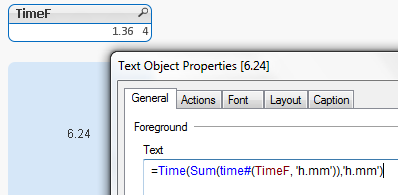
MarcoWedel
- Mark as New
- Bookmark
- Subscribe
- Mute
- Subscribe to RSS Feed
- Permalink
- Report Inappropriate Content
Interval(Sum(Interval#(field1,'hh.mm')),'hh.mm')
- Mark as New
- Bookmark
- Subscribe
- Mute
- Subscribe to RSS Feed
- Permalink
- Report Inappropriate Content
thanks'
yarin
- « Previous Replies
-
- 1
- 2
- Next Replies »