Unlock a world of possibilities! Login now and discover the exclusive benefits awaiting you.

- Qlik Community
- :
- All Forums
- :
- QlikView
- :
- Re: syntax- searching string for an action
- Subscribe to RSS Feed
- Mark Topic as New
- Mark Topic as Read
- Float this Topic for Current User
- Bookmark
- Subscribe
- Mute
- Printer Friendly Page

- Mark as New
- Bookmark
- Subscribe
- Mute
- Subscribe to RSS Feed
- Permalink
- Report Inappropriate Content
syntax- searching string for an action
Hi everyone,
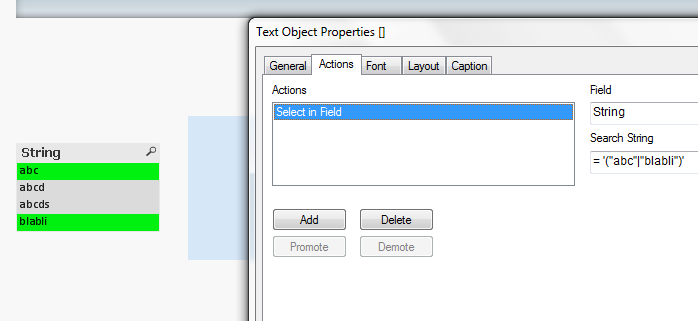
I would like to add an action, which helps to choose the searchwords i want. My problem is, if there are similar words, the action chooses all of them, but I want just one. for example:
there are:
abc
abcd
abcds
blabli
my expression for the searching string is:
= '("abc"|"blabli")'
this expression chooses all abc* strings, but i just want abc only, can somebody help me please? 

 tresB
tresB
- Mark as New
- Bookmark
- Subscribe
- Mute
- Subscribe to RSS Feed
- Permalink
- Report Inappropriate Content
I don't get the result so.
Could you post your sample app that replicates the issue?

 settu_periasamy
- Mark as New
- Bookmark
- Subscribe
- Mute
- Subscribe to RSS Feed
- Permalink
- Report Inappropriate Content
Hi,
I think you are trying the same expression in the Listbox -> Search..
("abc"|"blabli")
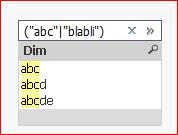
But, if you assign the expression in the Action Button, it will give your desired result, not 'abc*'..

 engishfaque
- Mark as New
- Bookmark
- Subscribe
- Mute
- Subscribe to RSS Feed
- Permalink
- Report Inappropriate Content
Dear Sevdolicious,
Here it is,
='(' & Concat ({<YourFieldName = {"abc*"}>} Distinct YourFieldName, '|')')'
Kind regards,
Ishfaque Ahmed
tresB
- Mark as New
- Bookmark
- Subscribe
- Mute
- Subscribe to RSS Feed
- Permalink
- Report Inappropriate Content
Even in the listbox, using 'Normal Search' mode - 'exact match' should have worked. Unfortunately, that doesn't work anymore.
settu_periasamy
- Mark as New
- Bookmark
- Subscribe
- Mute
- Subscribe to RSS Feed
- Permalink
- Report Inappropriate Content
Yes, I tested it. It gives all the value.
But if we give (abc|blabli) -> This give exact value
- Mark as New
- Bookmark
- Subscribe
- Mute
- Subscribe to RSS Feed
- Permalink
- Report Inappropriate Content
My searching string includes 2 words, therefore i had to use These " ".
Thank you all for your help 
settu_periasamy
- Mark as New
- Bookmark
- Subscribe
- Mute
- Subscribe to RSS Feed
- Permalink
- Report Inappropriate Content
Hi,
Look this as well Compound Search - demystified