Unlock a world of possibilities! Login now and discover the exclusive benefits awaiting you.

- Qlik Community
- :
- All Forums
- :
- QlikView
- :
- Re: text data splitting into columns and rows!
- Subscribe to RSS Feed
- Mark Topic as New
- Mark Topic as Read
- Float this Topic for Current User
- Bookmark
- Subscribe
- Mute
- Printer Friendly Page

 raadwiptec
- Mark as New
- Bookmark
- Subscribe
- Mute
- Subscribe to RSS Feed
- Permalink
- Report Inappropriate Content
text data splitting into columns and rows!
Hi all,
could somebody suggest a solution.
the source is a flat file and data is as below
id=transit secs="2010-03-07 11:36:44" route=6 mk=10 username=sam type=on schedule
id=peek secs="2010-03-07 11:36:44" route=9 mk=10 username=sam type=on schedule
id=dest secs="2010-03-07 11:36:44" route=10 mk=10 username=sam type=on schedule
id= arr secs="2010-03-07 11:36:44" route=12 mk=10 username=sam type=on schedule
for example:-
id=transit secs="2010-03-07 11:36:44" route=6 mk=10 username=sam type=on schedule. I am trying split each of them as a column
for ex
id =transit -- so id is a column here and 'transit' is the value
secs="2010-03-07 11:36:44" - so here I want to make 'secs' as the column and 2010-03-07 11:36:44" this is the value and this value may change accordingly with different timestamps and dates in this column
in qlikview if iam loading this I would like to have as below
id ¦ secs ¦
- Tags:
- new_to_qlikview
raadwiptec
- Mark as New
- Bookmark
- Subscribe
- Mute
- Subscribe to RSS Feed
- Permalink
- Report Inappropriate Content
hi claran,
As you mentioned can you please share how do I load each row as Data . so in my example if iam trying to load the file containing the below data as a atable
id=transit secs="2010-03-07 11:36:44" route=6 mk=10 username=sam type=on schedule
id=peek secs="2010-03-07 11:36:44" route=9 mk=10 username=sam type=on schedule
id=dest secs="2010-03-07 11:36:44" route=10 mk=10 username=sam type=on schedule
id= arr secs="2010-03-07 11:36:44" route=12 mk=10 username=sam type=on schedule
I have 2 options.
while loading the file if I give an option of none.. my columns look like @1,@2,@3
if I give option of embedded labels I get my column as
id=transit secs="2010-03-07 11:36:44" route=6 mk=10 username=sam type=on schedule

 gautik92
- Mark as New
- Bookmark
- Subscribe
- Mute
- Subscribe to RSS Feed
- Permalink
- Report Inappropriate Content
use textbetween
raadwiptec
- Mark as New
- Bookmark
- Subscribe
- Mute
- Subscribe to RSS Feed
- Permalink
- Report Inappropriate Content
hi claran
as you said in ur earlier post iam not able to load @1:n -how do I do this?
- TableName:
- LOAD [@1:n] AS data
- FROM
- [test.txt]
- (fix, codepage is 1252);
I basically tried to concatenate the tables like below
TableName:
LOAD
@1&@2&@3&@4&@5&@6&@7&@8&@9&@10&@11 as data
FROM xxxx.txt
After which I tried to load the CleanData. But there iam getting the values also concatenated.

 Digvijay_Singh
- Mark as New
- Bookmark
- Subscribe
- Mute
- Subscribe to RSS Feed
- Permalink
- Report Inappropriate Content
Based on amazing sugestion from ciaran.mcgowan , I created the sample qvw. I think we shouldn't worry how data is loaded, let it be one line per record as suggested-
Input:
LOAD @1:n as data
FROM
(fix, codepage is 1252);
CleanData:
LOAD
SubField(SubField(data, 'id=', 2), 'secs=', 1) AS ID,
SubField(SubField(data, 'secs=', 2), 'route=', 1) AS Secs,
SubField(SubField(data, 'route=', 2), 'mk=', 1) AS Route,
SubField(SubField(data, 'mk=', 2), 'username=', 1) AS mk,
SubField(SubField(data, 'username=', 2), 'type=', 1) AS Username,
Subfield(data, 'type=', 2) AS Type
Resident Input;
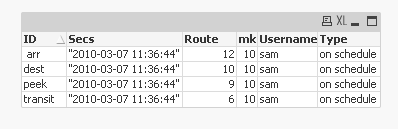
I just included mk also as a column in last suggested script by ciaran.mcgowan
Here are the qvw and sample file.
raadwiptec
- Mark as New
- Bookmark
- Subscribe
- Mute
- Subscribe to RSS Feed
- Permalink
- Report Inappropriate Content
hi Ciaran,
very nice.. Iam getting good results.. I need to test with the complete file. I will let you know. can you please tell me the code ...how subfield is managing this?
thanks digvijay..
the problem with my load earlier was
(fix, codepage is 1252); I was using --
(txt, codepage is 1252, no labels, delimiter is spaces, msq); where I wan not able to use the :n values

 ciaran_mcgowan
- Mark as New
- Bookmark
- Subscribe
- Mute
- Subscribe to RSS Feed
- Permalink
- Report Inappropriate Content
Hi raadwiptec,
Glad to hear it. Subfield works by splitting up a field into smaller pieces by looking through a field for a specified value, once it finds it, it will return everything to the left or right of it.
If you had a string called FRUIT that contained the following vaule: "Apple-Orange-Grape-Pear-Banana" it can be split up using the "-" as a separator like this:
Subfield(FRUIT,'-',1) AS Fruit1, will return Apple
Subfield(FRUIT,'-',2) AS Fruit2 will return Orange
Subfield(FRUIT,'-',3) AS Fruit3, will return Grape
Subfield(FRUIT,'-',4) AS Fruit4, will return Pear
Subfield(FRUIT,'-',5) AS Fruit5, will return Banana
In your case, I used Subfield twice so it will search for everything to the left of the desired text and everything to the right and return what's in between the two:
SubField(SubField(data, 'id=', 2), 'secs=', 1) AS ID
Breakdown:
Original: "id=transit secs="2010-03-07 11:36:44" route=6 mk=10 username=sam type=on schedule"
SubField(data, 'id=', 2) would return everything to the right of the "id=" text
Result: "transit secs="2010-03-07 11:36:44" route=6 mk=10 username=sam type=on schedule"
SubField(data, 'secs=', 1) would return everything to the left of the "secs=" text
Result: "id=transit "
Combining the two tells it for first search for everything to the right of "id=" and then, from the result of that, everything to the left of the "secs=" which is why SubField(SubField(data, 'id=', 2), 'secs=', 1) will return transit for the above example.
raadwiptec
- Mark as New
- Bookmark
- Subscribe
- Mute
- Subscribe to RSS Feed
- Permalink
- Report Inappropriate Content
is it possible to take the year ,month and date from the secs column - ="2010-03-07 11:36:44"
as it is in quotes .. it is not recognizing if I give
load
year(Secs) as year
resident clean Data
Digvijay_Singh
- Mark as New
- Bookmark
- Subscribe
- Mute
- Subscribe to RSS Feed
- Permalink
- Report Inappropriate Content
You can remove " by purgechar and then interpret it as Timestamp.
Timestamp#(PurgeChar(SubField(SubField(data, 'secs=', 2), 'route=', 1),'"'),'YYYY-MM-DD hh:mm:ss') AS Secs,
 Colin-Albert
- Mark as New
- Bookmark
- Subscribe
- Mute
- Subscribe to RSS Feed
- Permalink
- Report Inappropriate Content
>In your case, I used Subfield twice so it will search for everything to the left of the desired text and everything to the right and return what's in between the two:
Hi Ceiran,
The textbetween() function can do this eliminating the need to use two subfield functions
textbetween(data, 'id=', 'secs=', ) as Secs
ciaran_mcgowan
- Mark as New
- Bookmark
- Subscribe
- Mute
- Subscribe to RSS Feed
- Permalink
- Report Inappropriate Content
Good to know!
Thanks.
