Unlock a world of possibilities! Login now and discover the exclusive benefits awaiting you.

Announcements
ALERT: QlikView server communication interruptions following Microsoft Windows Domain Controller security updates
- Qlik Community
- :
- All Forums
- :
- QlikView
- :
- Re: under presentaion ->refernce lines
Options
- Subscribe to RSS Feed
- Mark Topic as New
- Mark Topic as Read
- Float this Topic for Current User
- Bookmark
- Subscribe
- Mute
- Printer Friendly Page
Turn on suggestions
Auto-suggest helps you quickly narrow down your search results by suggesting possible matches as you type.
Showing results for

 sonysree88
Creator II
2016-10-25
01:01 PM
- Mark as New
- Bookmark
- Subscribe
- Mute
- Subscribe to RSS Feed
- Permalink
- Report Inappropriate Content
under presentaion ->refernce lines
Hi all,
Can you anyone please let me know the use refernece lines in qlikview and it is applicable for all the objects or any restriction
Please provide step by step with example
Regards
Sonysree
442 Views
3 Replies

 vinieme12
Champion III
2016-10-25
02:04 PM
- Mark as New
- Bookmark
- Subscribe
- Mute
- Subscribe to RSS Feed
- Permalink
- Report Inappropriate Content
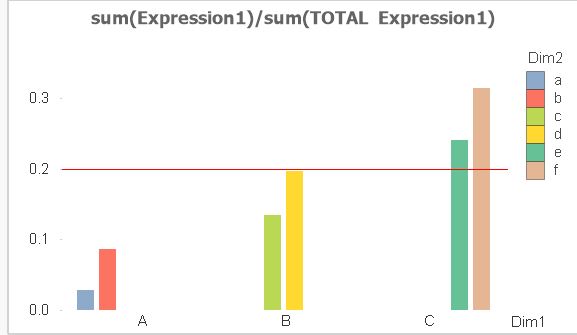
You can use reference lines to denote Targets / Thresholds.
in the below sample reference line is set to 0.2 (20%) It's gives the user a visual cue to know if they are over or under required levels depending upon requirement
Vineeth Pujari
If a post helps to resolve your issue, please accept it as a Solution.
If a post helps to resolve your issue, please accept it as a Solution.
386 Views

 Frank_Hartmann
Master II
2016-10-25
02:27 PM
- Mark as New
- Bookmark
- Subscribe
- Mute
- Subscribe to RSS Feed
- Permalink
- Report Inappropriate Content
For vertical reference line see this video:
Qlikview Vertical Reference Lines by RFB 147 - YouTube
hope this helps
386 Views

Anonymous
Not applicable
2016-10-26
12:48 AM
- Mark as New
- Bookmark
- Subscribe
- Mute
- Subscribe to RSS Feed
- Permalink
- Report Inappropriate Content
Hi, you can try this.
Access the chart properties. Add 2 Reference Lines.

x-axis

y-axis

Thanks,
386 Views