Unlock a world of possibilities! Login now and discover the exclusive benefits awaiting you.

- Qlik Community
- :
- All Forums
- :
- QlikView
- :
- Re: use total sum in Pivot
- Subscribe to RSS Feed
- Mark Topic as New
- Mark Topic as Read
- Float this Topic for Current User
- Bookmark
- Subscribe
- Mute
- Printer Friendly Page

- Mark as New
- Bookmark
- Subscribe
- Mute
- Subscribe to RSS Feed
- Permalink
- Report Inappropriate Content
use total sum in Pivot
Hello Guys,
I hope you can help me.
how can i use the red marked field in my expression:
if(red_field>0,sum(value))
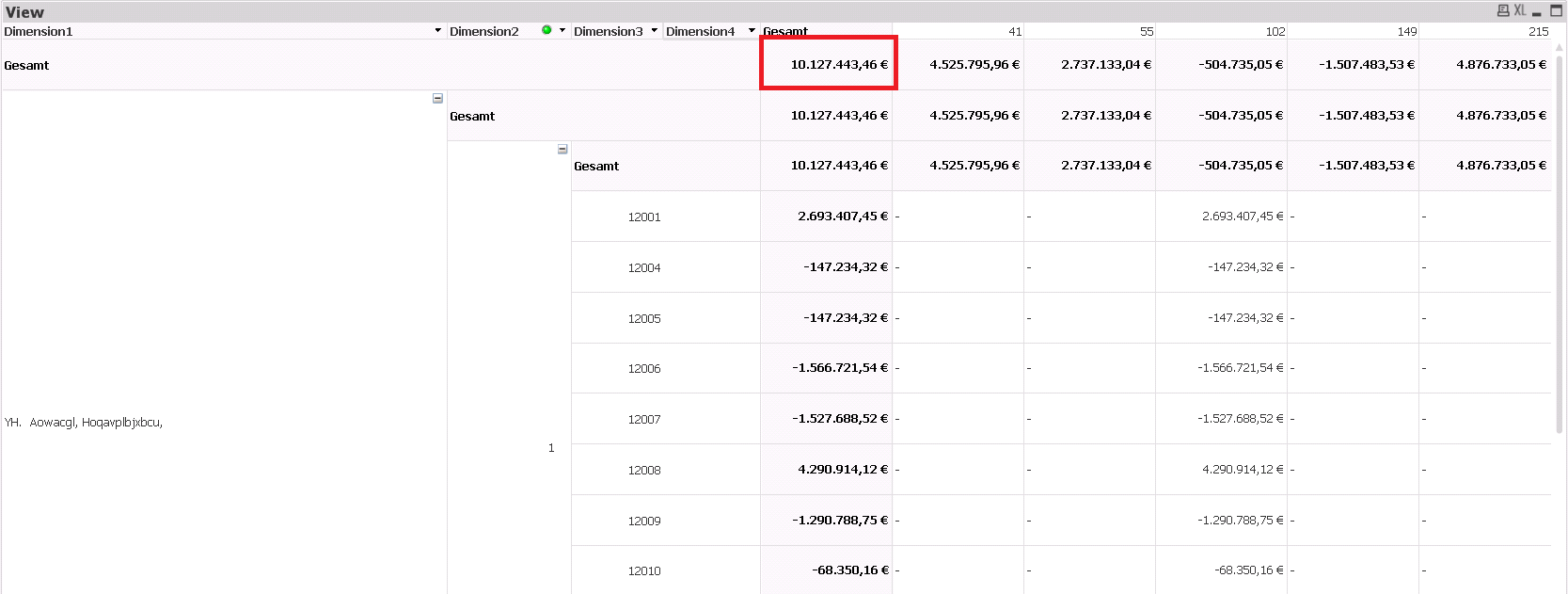
(gesamt=total)
Kind Regards,
Lukas
Accepted Solutions

 swuehl
- Mark as New
- Bookmark
- Subscribe
- Mute
- Subscribe to RSS Feed
- Permalink
- Report Inappropriate Content
Try TOTAL qualifier with field / dimension list:
=sum(TOTAL<Dimension1> ExpressionValue)
(or specify all the Dimensions you need to consider for your total sum, sum(TOTAL<Dimension1, Dimension2> ExpressionValue) )
But this will only return the total in the same context of Dimension1, i.e. you can't refer the same subtotal for all lines (lines that belong do different Dimension1 values). Do you need something like this?
swuehl
- Mark as New
- Bookmark
- Subscribe
- Mute
- Subscribe to RSS Feed
- Permalink
- Report Inappropriate Content
Lukas,
it looks like you are using four dimensions and one expression, right?
So if you expression looks like
=sum( ExpressionValue)
then try
=sum(TOTAL ExpressionValue)
to retrieve the overall total value (I assume that is your Gesamt value outlined in red).
Then try
= if(sum(TOTAL ExpressionValue) >0, sum( AnotherValue))
Hope this helps,
Stefan
- Mark as New
- Bookmark
- Subscribe
- Mute
- Subscribe to RSS Feed
- Permalink
- Report Inappropriate Content
hi Stefan,
i think my example is not so good, here another example.
Its not always the Total value.
I've tried something with dimensionality ( ) = 1 but it also doesn't work.
any ideas?
swuehl
- Mark as New
- Bookmark
- Subscribe
- Mute
- Subscribe to RSS Feed
- Permalink
- Report Inappropriate Content
Try TOTAL qualifier with field / dimension list:
=sum(TOTAL<Dimension1> ExpressionValue)
(or specify all the Dimensions you need to consider for your total sum, sum(TOTAL<Dimension1, Dimension2> ExpressionValue) )
But this will only return the total in the same context of Dimension1, i.e. you can't refer the same subtotal for all lines (lines that belong do different Dimension1 values). Do you need something like this?
- Mark as New
- Bookmark
- Subscribe
- Mute
- Subscribe to RSS Feed
- Permalink
- Report Inappropriate Content
thank you 🙂
now it works.