Unlock a world of possibilities! Login now and discover the exclusive benefits awaiting you.

- Qlik Community
- :
- All Forums
- :
- QlikView
- :
- Re: [_xlnm#_FilterDatabase] --- urgent help ple...
- Subscribe to RSS Feed
- Mark Topic as New
- Mark Topic as Read
- Float this Topic for Current User
- Bookmark
- Subscribe
- Mute
- Printer Friendly Page

- Mark as New
- Bookmark
- Subscribe
- Mute
- Subscribe to RSS Feed
- Permalink
- Report Inappropriate Content
[_xlnm#_FilterDatabase] --- urgent help please
Hi,
I have excel sheet from Jan to Dec in excel workbook. I used script to load all excel sheets at a time in qvw. when reloading it is showing below error.
Field not found - <Name?
(ID)>
[_xlnm#_FilterDatabase]:
can anyone suggest me this how to sort our this. I google the error but not found solution.
Thanks.
- Tags:
- new_to_qlikview
- « Previous Replies
-
- 1
- 2
- Next Replies »
- Mark as New
- Bookmark
- Subscribe
- Mute
- Subscribe to RSS Feed
- Permalink
- Report Inappropriate Content
I observed this when loading table files


 giakoum
- Mark as New
- Bookmark
- Subscribe
- Mute
- Subscribe to RSS Feed
- Permalink
- Report Inappropriate Content
try it with brackets. and make sure it is continuous on the same line
 martinpohl
- Mark as New
- Bookmark
- Subscribe
- Mute
- Subscribe to RSS Feed
- Permalink
- Report Inappropriate Content
within the sqltables statement you get sheets but also areas, defined in your Excel-file.
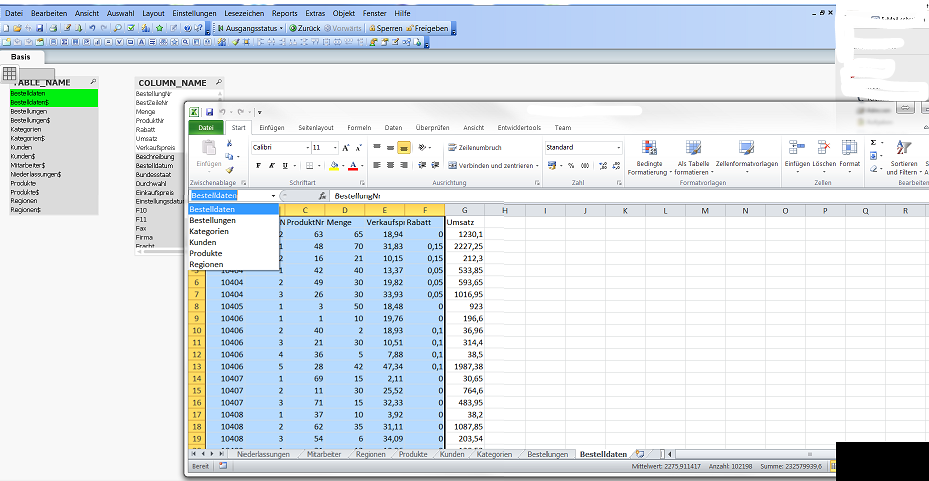
In that case the sheet name is the same with the area-name, prefixed with an $.
so load only table, ending with an $ in your loop.
Regards

 settu_periasamy
- Mark as New
- Bookmark
- Subscribe
- Mute
- Subscribe to RSS Feed
- Permalink
- Report Inappropriate Content
Hi,
may be the hidden objects in excel (not hidden sheet).
For checking purpose, copy 3 excel sheets, paste special value into another workbook.. then try with the same script
- Mark as New
- Bookmark
- Subscribe
- Mute
- Subscribe to RSS Feed
- Permalink
- Report Inappropriate Content
Thanks. where I need to use $. please let me know
martinpohl
- Mark as New
- Bookmark
- Subscribe
- Mute
- Subscribe to RSS Feed
- Permalink
- Report Inappropriate Content
in your script here:
Tables1:
load
*,
replace(TABLE_NAME,chr(39),'') as NEW
resident tables;
change to
Tables1:
load
*,
replace(TABLE_NAME,chr(39),'') as NEW
resident tables
where TABLE_NAME like '*$'
;
but I'm not sure if a $ works in a statement.
Otherwise replace it in load load script in a new field
e.g. replace(TABLE_NAME,'$','TAB') as TABLE_NAME_NEW
and use
where TABLE_NAME like '*TAB'
- Mark as New
- Bookmark
- Subscribe
- Mute
- Subscribe to RSS Feed
- Permalink
- Report Inappropriate Content
Thanks. it's working.
- Mark as New
- Bookmark
- Subscribe
- Mute
- Subscribe to RSS Feed
- Permalink
- Report Inappropriate Content
Thanks to all!
- Mark as New
- Bookmark
- Subscribe
- Mute
- Subscribe to RSS Feed
- Permalink
- Report Inappropriate Content
Thanks Jakub...it is working fine for me...given code remove unwanted files from the excels or csv and provide you required file only. 

 pgalvezt
- Mark as New
- Bookmark
- Subscribe
- Mute
- Subscribe to RSS Feed
- Permalink
- Report Inappropriate Content
If you use Store Sentence. You have to use too the Jakub's script : Because store Save a qvd( "xlnm#_FilterDatabase").. 
IF Index('$(sheetName)','FilterDatabase')=0 then
STORE Table1 into $(LocationQvd)NameQVD $(sheetName).qvd;
DROP TABLE Table1;
ENDIF
NEXT
Thank you Jakub your solution is nice
- « Previous Replies
-
- 1
- 2
- Next Replies »