Unlock a world of possibilities! Login now and discover the exclusive benefits awaiting you.

- Qlik Community
- :
- Forums
- :
- Analytics & AI
- :
- Products & Topics
- :
- Reporting Service & Alerting
- :
- Qlik Reporting API with selections in SenseExcelTe...
- Subscribe to RSS Feed
- Mark Topic as New
- Mark Topic as Read
- Float this Topic for Current User
- Bookmark
- Subscribe
- Mute
- Printer Friendly Page

 HenkTenk
- Mark as New
- Bookmark
- Subscribe
- Mute
- Subscribe to RSS Feed
- Permalink
- Report Inappropriate Content
Qlik Reporting API with selections in SenseExcelTemplate
Hi all,
I have been busy with requesting excel reports from Qlik Saas using the API's using this endpoint: https://yourtenant.yourlocation.qlikcloud.com/api/v1/reports
with this body:
This works and it gives me the right report, now I want to add selections during this API call but i am struggling with the right syntax for SenseDataTemplate.
When i make a similar request with sense-image, the selections are applied as described in the documentation. Can it be that the combination of SenseDataTemplate and selections does not work?
Does anyone know how to add fieldselections in this API call?

 diegozecchini
- Mark as New
- Bookmark
- Subscribe
- Mute
- Subscribe to RSS Feed
- Permalink
- Report Inappropriate Content
Hi!
What if you utilize bookmarks within your Qlik Sense app? Bookmarks capture a specific selection state, and you can reference them in your API request to apply those selections to your report.
When you create a bookmark, note the bookmarkId and modify your API request body, to include the bookmarkId
Here's an example of how your API request body might look:
{
"type": "sense-excel-template-1.0",
"output": {
"type": "xlsx",
"outputId": "xlsx1",
"excelOutput": {
"outFormat": "xlsx"
}
},
"SenseExcelTemplate": {
"appId": "b555f8b3-c8b4-678e-77aa-30281315a06f",
"id": "rZbjLrt",
"templateLocation": {
"path": "https://yourtenant.yourlocation.qlikcloud.com/api/v1/report-templates/appid",
"format": "url"
},
"bookmarkId": "your-bookmark-id"
}
}
By referencing the bookmarkId, the report will generate based on the selections saved in that bookmark.
HenkTenk
- Mark as New
- Bookmark
- Subscribe
- Mute
- Subscribe to RSS Feed
- Permalink
- Report Inappropriate Content
Hi Diego,
Thank you for your reply. However, I want to make dynamic selections using the API, based on CustomerID for example. Can I also send a variable value with this API call ?
diegozecchini
- Mark as New
- Bookmark
- Subscribe
- Mute
- Subscribe to RSS Feed
- Permalink
- Report Inappropriate Content
Hi!
It is not clear for me in docs so this is a try, add a "selections" object inside your request body, similar to how selections work for sense-image reports.
{
"type": "sense-excel-template-1.0",
"output": {
"type": "xlsx",
"outputId": "xlsx1",
"excelOutput": {
"outFormat": "xlsx"
}
},
"SenseExcelTemplate": {
"appId": "b555f8b3-c8b4-678e-77aa-30281315a06f",
"id": "rZbjLrt",
"templateLocation": {
"path": "https://yourtenant.yourlocation.qlikcloud.com/api/v1/report-templates/appid",
"format": "url"
},
"selections": [
{
"field": "CustomerID",
"values": ["12345"]
}
]
}
}
You can pass multiple field selections like this:
"selections": [
{
"field": "CustomerID",
"values": ["12345"]
},
{
"field": "Region",
"values": ["Europe"]
}
]
This should apply the selections dynamically before generating the report. If this doesn’t work, check the Qlik API documentation to confirm whether sense-excel-template-1.0 supports direct field selections
HenkTenk
- Mark as New
- Bookmark
- Subscribe
- Mute
- Subscribe to RSS Feed
- Permalink
- Report Inappropriate Content
Hi Diego,
Unfortunately this syntax does not work, it seems to ignore the values in the selections part.
The documentation states that selectionChain is a possibility for senseExcelTemplate but i have not been able yet to figure out the right syntax. When I apply this selectionChain property for the image generation part, it does apply the selections as requested.
I hope anyone is able to assist to find the right syntax
 Ajay_S1
- Mark as New
- Bookmark
- Subscribe
- Mute
- Subscribe to RSS Feed
- Permalink
- Report Inappropriate Content
Hi Henk,
I’m currently implementing this reporting in a mashup, and it’s working well overall. However, I’m facing the same issue when it comes to passing the selections.
Were you able to find a fix for this? If so, could you please share the working selection syntax?

 Greg_Taffer
- Mark as New
- Bookmark
- Subscribe
- Mute
- Subscribe to RSS Feed
- Permalink
- Report Inappropriate Content
Yes, the Qlik Reporting API supports selections with SenseDataTemplate (often used in Excel reporting), but the syntax is stricter than sense-image. Ensure selections are applied inside the templateSelections array within the request body. If the field is a string, use double quotes, and ensure the appId is correct.
Correct Syntax Example
To apply selections, include the templateSelections structure at the same level as your SenseDataTemplate definition:
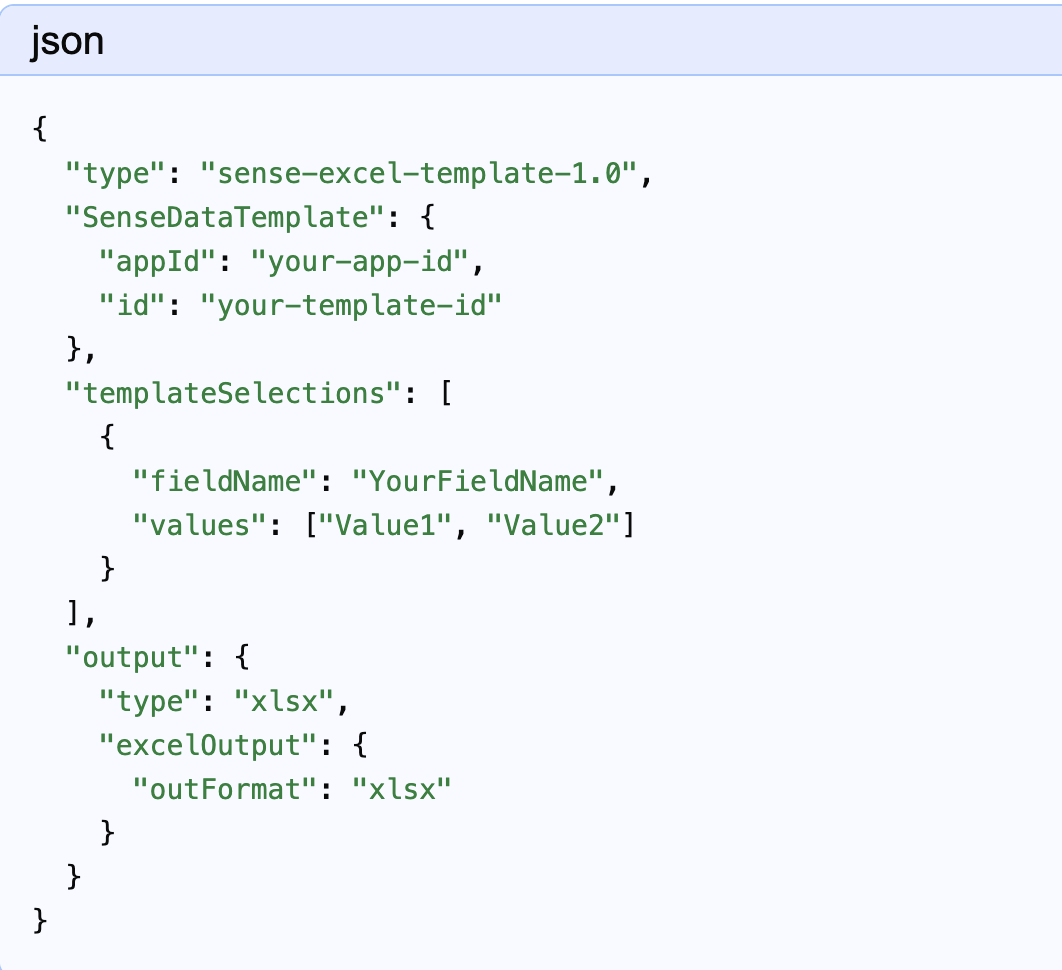
Troubleshooting Steps
- Field Type: Ensure numerical values are passed without quotes and string values are quoted.
- Case Sensitivity: Field names are case-sensitive.
- Field Selection API: If templateSelections fails, ensure you are not missing an "s" in fieldName/values, as API structure is strict.
- Inspect Request: If it still fails, use the browser developer console to inspect the API call being made by the Qlik Reporting Service.
Ajay_S1
- Mark as New
- Bookmark
- Subscribe
- Mute
- Subscribe to RSS Feed
- Permalink
- Report Inappropriate Content
Hi Grey,
Thankyou for the support.
There is slight change in my payload.
My template is sense-excel-template-1.0
and my output should be pdf.
The report is downloading in mashup. but the selection is not applying
      {
        "type": "sense-excel-template-1.0",
        "meta": {
          "exportDeadline": "P0Y0M0DT1H0M0S",
          "tags": ["sense-ondemand.download"] },
        "output": {
          "outputId": "pdf_file",
          "pdfOutput": {},
          "type": "pdf"
        },
        "senseExcelTemplate":
        {
          "jsOpts": {
            "language": "en",
            "theme": "Dark Text"
          },
           "selectionChain": [
            {
              "selectionType": "selectionFilter",
              "selectionFilter":
              {
                "fieldName": "List_",
                "values": [
                  {
                    "text": "Latest",
                    "isNumeric": false
                  }
                ],
                "defaultIsNumeric": false
              }

            }
          ],
          "templateLocation": {
            "format": "url",
            "path": "https://tenant.region.qlikcloud.com/api/v1/report-templates/<templateid>"
          }
        }
        }
Note: The payload template was taken from the Developer Tools when the ‘Download On-Demand Report’ button was clicked in Qlik.

