Unlock a world of possibilities! Login now and discover the exclusive benefits awaiting you.

- Qlik Community
- :
- Forums
- :
- Groups
- :
- Industry and Topics
- :
- Scalability
- :
- Re: Qlik Sense Enterprise Scalability Tools
- Subscribe to RSS Feed
- Mark Topic as New
- Mark Topic as Read
- Float this Topic for Current User
- Bookmark
- Subscribe
- Mute
- Printer Friendly Page
- Do Not Feature this Topic

 Daniel_Larsson
- Mark as New
- Bookmark
- Subscribe
- Mute
- Subscribe to RSS Feed
- Permalink
- Report Inappropriate Content
Qlik Sense Enterprise Scalability Tools
This tool is being deprecated, updates will be received during 2026, but thenceforth be considered deprecated.
The Qlik Sense Enterprise Scalability Tools (QSEST) are used to create and run load and performance tests towards Qlik Sense Enterprise on Windows (QSEoW).
Included parts are:
- Documentation on how to use the package
- Command line tool for Windows, Mac and Linux. This command line tool (gopherciser) is open source and can be found here .
- GUI for Windows and Linux.
Downloadable files can be found here:
📎 Qlik Sense Enterprise Scalability Tools
Qlik Sense documents to help analyze result and log files can be found here :https://community.qlik.com/docs/DOC-15451
Change log
v1.14.1
- Bugfix for entering JWT key path
- Gopherciser v0.21.23 -> v0.22.2
- Avoid errors with JWT keys when running as wasm in GUI
- improved IPv6 handling
-
bugfixes
v1.14.0
- Added linux arm64 binaries
- Removed osx binaries
- Updated scheduler including support for linux arm64
- Support for QSEoW Nov 2025
- Gopherciser v0.20.1 -> v0.21.23
- Bugfixes
- Support nl insights objects
- Support Treedata calculation condition
- Add sn-nav-menu to supported objects.
- Add arm64 linux binaries
- Add scheduler and CPU metrics to prometheus pushed metrics
- Add configurable thinktime inbetween publishing and unpublishing sheets
- Add optional timeout settings to open app action
- Add possibility to generate empty script to template command
- Autodetect privatekey type and update default signing algorithm when using jwtsettings
- Support for PS256,PS384,PS512,ES256,ES384,ES512 and EdDSA JWT signing algorithms
- Duplicatesheet improvements
- Limit request concurrency while getting app structure
v1.13.0
- Gopherciser v0.18.7 -> v0.20.1
- QSEoW Nov24 support
- Support sn-tabbed-container object
- Openapp changed for Nov24 api compliance
- New default websocket reconnect backoff pattern
- Bugfixes
v1.12.0
- Updated scheduler
- Gopherciser v0.18.5 - v0.18.7
- performance enhancements
- new action stepdimension
Your use of Qlik Sense Enterprise Scalability Tools will be subject to the same license agreement between you and Qlik for your Qlik Sense License. Qlik does not provide maintenance and support services for the Qlik Sense Enterprise Scalability Tools, however please check QlikCommunity for additional information on use of these products.

 katie_maxwell
- Mark as New
- Bookmark
- Subscribe
- Mute
- Subscribe to RSS Feed
- Permalink
- Report Inappropriate Content
I turned on Developer Tools in Chrome then tried to import the 200M-PTSalesAnalytics-v3.qvf app. The error that is reported in Developer Tools is status code 413: Request entity too large. I tried other browsers. Firefox/Edge said the same error as Chrome. Internet Explorer (v11) wouldn't let me click the import button after browsing to the qvf app. After selecting the app it displays a message: "This browser has a 4 GB size limit for app import. Try using a different browser." But none of the browser allow me to import this app. The qvf is 5.54 GB after downloaded. Since it's getting hung up due to a browser file size upload limitation maybe that's why the error wasn't being written to the logs.

.png "Former Employee") rku
rku
- Mark as New
- Bookmark
- Subscribe
- Mute
- Subscribe to RSS Feed
- Permalink
- Report Inappropriate Content
Hello,
Thanks for providing all the information. It is clear that client is not initiating import process so there is no need to check the server side at the moment.
The limit of 4 GB is known on IE11 but Chrome and FF are the ones allow to upload files >4GB size. I have tested it myself using Chrome on Feb 21 Qlik Sense Enterprise in two different deployments and I never ever got this message and in fact, the upload was finished within minutes.
Since you have tested on all the browsers and you get the same error, I would suggested you to check with your organisation IT if they have proxies enabled which are preventing Chrome to upload app more than 4GB size.
I can not think of anything else other than some environmental limits to this problem.
When you get the answer, please let me know. Thank you!
/Rohit
katie_maxwell
- Mark as New
- Bookmark
- Subscribe
- Mute
- Subscribe to RSS Feed
- Permalink
- Report Inappropriate Content
Hi Rohit, you were correct! There was a default max upload size specified on the proxy that was hindering the import of the qvf. Once that default was increased I was import the file. Thank you for your assistance!
rku
- Mark as New
- Bookmark
- Subscribe
- Mute
- Subscribe to RSS Feed
- Permalink
- Report Inappropriate Content
Hi,
Happy to know that it works for you now.
Regards,
Rohit
 Kate_M
- Mark as New
- Bookmark
- Subscribe
- Mute
- Subscribe to RSS Feed
- Permalink
- Report Inappropriate Content
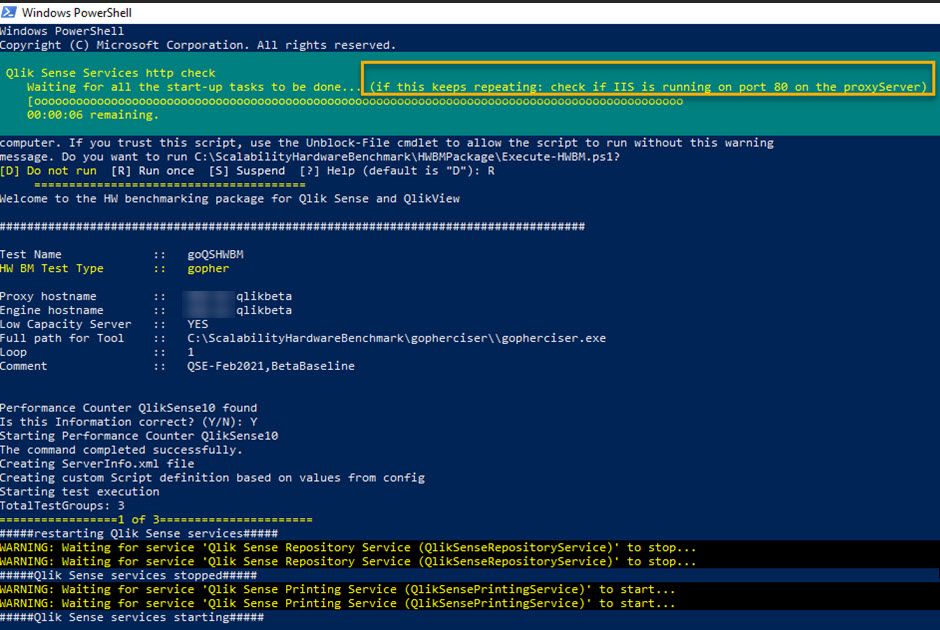
Hardware Benchmark - Scalability tools - issue with restarting the Qlik services - It's looping through the PowerShell script (HWBMPackage.ps1). The message indicates to check if IIS is running on port 80. I've confirmed that IIS is not even enabled/installed on the server and port 80 is open.
Just wondering how to troubleshoot if anyone as any tips! Thank you in advance 🙂

 vadim_pozdnyako
- Mark as New
- Bookmark
- Subscribe
- Mute
- Subscribe to RSS Feed
- Permalink
- Report Inappropriate Content
Hi, QSEST team!
I have an application with bookmarks which should be applied after sheet open. Also application have some actions on every sheet.
I wrote scenario with "applybookmark" and "clickactionbutton", but it seems didn't work (audit log do not show any bookmark's selections).
Could you tell me does this functionality works or not?
Thank you!
 SebastianFabian
- Mark as New
- Bookmark
- Subscribe
- Mute
- Subscribe to RSS Feed
- Permalink
- Report Inappropriate Content
Hi Vadim!
When you execute the applybookmark, what's the output of the QSEST/Gopherciser log file? Does it complete without errors/warnings?
vadim_pozdnyako- Mark as New
- Bookmark
- Subscribe
- Mute
- Subscribe to RSS Feed
- Permalink
- Report Inappropriate Content
Sebastian, 0 errors, 0 warnings. But details field is 'false;;true'.
And I do not see any selections in audit log.


SebastianFabian
- Mark as New
- Bookmark
- Subscribe
- Mute
- Subscribe to RSS Feed
- Permalink
- Report Inappropriate Content
If you get that kind of output, it means the bookmark was successfully applied. If there was an error applying it, or it couldn't be found, you would have gotten an error message. I'm not sure what exact events the audit log would capture.
To explain the details field, it is meant for troubleshooting and is generated as such:
fmt.Sprintf("%v;%s;%v", sheetID != "", sheetID, settings.SelectionsOnly)
Meaning that in your case, sheetID is empty and SelectionOnly is enabled, which is correct if you do not want to navigate to a different sheet. Is there anything else suggesting the bookmark application is not working or just the lack of an entry in the audit log?
Daniel_Larsson
- Mark as New
- Bookmark
- Subscribe
- Mute
- Subscribe to RSS Feed
- Permalink
- Report Inappropriate Content
Hi @vadim_pozdnyakov ,
To verify selections getting applied, assuming this is simulating towards windows using header auth, you can login with a header modification plugin in your browser as the simulated user before starting the simulation, then watch the selections getting applied by the tool there.
