Unlock a world of possibilities! Login now and discover the exclusive benefits awaiting you.

- Qlik Community
- :
- Forums
- :
- Analytics & AI
- :
- Products & Topics
- :
- Visualization and Usability
- :
- Actions in Vizlib button
- Subscribe to RSS Feed
- Mark Topic as New
- Mark Topic as Read
- Float this Topic for Current User
- Bookmark
- Subscribe
- Mute
- Printer Friendly Page

 Ashif
Ashif
- Mark as New
- Bookmark
- Subscribe
- Mute
- Subscribe to RSS Feed
- Permalink
- Report Inappropriate Content
Actions in Vizlib button
Hi All,
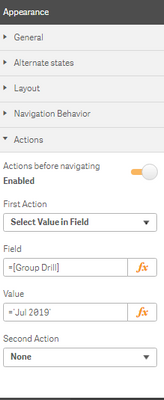
I have two Vizlib Buttons as mentioned below in Qlik sense. when i click Kye Graphs Button it should be take into key graph sheet with selected value field. But Selected value in field Action is not working . please help me on this issue.

Thanks,

 piersbatchelor_
- Mark as New
- Bookmark
- Subscribe
- Mute
- Subscribe to RSS Feed
- Permalink
- Report Inappropriate Content
Hi Ashif,
I hope you're enjoying using the Vizlib Library!
We have a comprehensive article on how Vizlib Actions can be used, please review the link to our community below. For future questions, please email us at support@vizlib.com or reach out to us in the Vizlib Community 😀
https://community.vizlib.com/support/solutions/articles/35000121898-vizlib-actions
Your values should be as follows, this means no rackets or equals sign required, plain and simple 😎
Field: Group Drill
Value: Jul 2019
 mlgross
- Mark as New
- Bookmark
- Subscribe
- Mute
- Subscribe to RSS Feed
- Permalink
- Report Inappropriate Content
I really wish these help articles were still available and hadn't been replaced when the company changed hands. If there is a way to reinstate these, that would be wonderful.
 Arwa_Elshahawy
- Mark as New
- Bookmark
- Subscribe
- Mute
- Subscribe to RSS Feed
- Permalink
- Report Inappropriate Content
if you try to add an action in qlik, there is a clickable Text "Vizlib Actions Documentation", when u click on it, it opens the comprehensive article on how Vizlib Actions can be used
