Unlock a world of possibilities! Login now and discover the exclusive benefits awaiting you.

- Qlik Community
- :
- Forums
- :
- Analytics & AI
- :
- Products & Topics
- :
- Visualization and Usability
- :
- Re: Adding ListBox in Qlik Sense
- Subscribe to RSS Feed
- Mark Topic as New
- Mark Topic as Read
- Float this Topic for Current User
- Bookmark
- Subscribe
- Mute
- Printer Friendly Page

 qlikcheepirishe
- Mark as New
- Bookmark
- Subscribe
- Mute
- Subscribe to RSS Feed
- Permalink
- Report Inappropriate Content
Adding ListBox in Qlik Sense
I have Data in which Year field is from 2000 to 2017.
I want to take the Year Field (i.e. listbox) from Year 2011 to 2015 in list box.
what is the script behind to add just Year 2011,2012,2013,2014 & 2015.

 OmarBenSalem
- Mark as New
- Bookmark
- Subscribe
- Mute
- Subscribe to RSS Feed
- Permalink
- Report Inappropriate Content
Create a new listBox object, and as a dimension enter:
=if(Year>=2011 and Year<=2015,Year,Null())
qlikcheepirishe
- Mark as New
- Bookmark
- Subscribe
- Mute
- Subscribe to RSS Feed
- Permalink
- Report Inappropriate Content
thanks it is helpful omarbensalem
OmarBenSalem
- Mark as New
- Bookmark
- Subscribe
- Mute
- Subscribe to RSS Feed
- Permalink
- Report Inappropriate Content
I'd propose you build it as a master dimension if you're using qlik sense 3.2; that way, when you make a selection in this new field, in the selection bar, you won't get the expression shown :
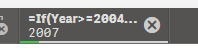
But instead the name of the new created master dimension
qlikcheepirishe
- Mark as New
- Bookmark
- Subscribe
- Mute
- Subscribe to RSS Feed
- Permalink
- Report Inappropriate Content
I am using qliksense desktop 3.1 SR3.
so is there any other way to remove the expression after selection the year field
OmarBenSalem
- Mark as New
- Bookmark
- Subscribe
- Mute
- Subscribe to RSS Feed
- Permalink
- Report Inappropriate Content
No, the only way is to upgrade to the latest version(3.2) as I already told you.
If your question have been answered, please close the thread by marking the correct answer as correct.
Omar,
