Unlock a world of possibilities! Login now and discover the exclusive benefits awaiting you.

Announcements
Share your agentic AI experience, learn from others, and earn a new badge: Put Agentic AI to Work
- Qlik Community
- :
- Forums
- :
- Analytics & AI
- :
- Products & Topics
- :
- Visualization and Usability
- :
- Re: Adding color to aggr expression
Options
- Subscribe to RSS Feed
- Mark Topic as New
- Mark Topic as Read
- Float this Topic for Current User
- Bookmark
- Subscribe
- Mute
- Printer Friendly Page
Turn on suggestions
Auto-suggest helps you quickly narrow down your search results by suggesting possible matches as you type.
Showing results for

 MikeF
MikeF
Contributor II
2022-09-10
10:03 AM
- Mark as New
- Bookmark
- Subscribe
- Mute
- Subscribe to RSS Feed
- Permalink
- Report Inappropriate Content
Adding color to aggr expression
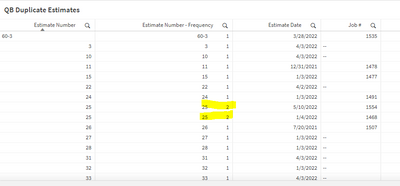
I have this expression that I pulled from another post and it is working in my app now. How do you add color to this expression when the count >1. Thanks/Mike
=aggr(
only({<[Estimate number]=>}[Estimate number])
& repeat(chr(160),16)
&num(
count({<[Estimate number]=>}DISTINCT [Job ID])
,'#,##0')
,[Estimate number])
1,135 Views
1 Solution
Accepted Solutions
MikeF
Contributor II
2022-09-11
09:26 AM
Author
- Mark as New
- Bookmark
- Subscribe
- Mute
- Subscribe to RSS Feed
- Permalink
- Report Inappropriate Content
Thanks that worked perfectly!
1,092 Views
2 Replies

 Rockstar7
Partner - Creator
2022-09-11
07:01 AM
- Mark as New
- Bookmark
- Subscribe
- Mute
- Subscribe to RSS Feed
- Permalink
- Report Inappropriate Content
you can write text color expression using second expression in your logic
count({<[Estimate number]=>}DISTINCT [Job ID])

Like this:
if((count({<[Estimate number]=>}DISTINCT [Job ID]))>1,green(),red())
MikeF
Contributor II
2022-09-11
09:26 AM
Author
- Mark as New
- Bookmark
- Subscribe
- Mute
- Subscribe to RSS Feed
- Permalink
- Report Inappropriate Content
Thanks that worked perfectly!
1,093 Views
