Unlock a world of possibilities! Login now and discover the exclusive benefits awaiting you.

- Qlik Community
- :
- Forums
- :
- Analytics & AI
- :
- Products & Topics
- :
- Visualization and Usability
- :
- Re: Adding values to more than one field
- Subscribe to RSS Feed
- Mark Topic as New
- Mark Topic as Read
- Float this Topic for Current User
- Bookmark
- Subscribe
- Mute
- Printer Friendly Page

 tfc
tfc
- Mark as New
- Bookmark
- Subscribe
- Mute
- Subscribe to RSS Feed
- Permalink
- Report Inappropriate Content
Adding values to more than one field
Suppose I have a list of students and the courses they're taking. The courses they are taking are in all one field separated by '/' for each student for example:
Name Id Courses
Example 1234 C/C++/Java/Python
And I want to make a bar chart to show the popularity of these courses (how many students are taking each course). How can I add more than 1 value in the expression editor so that for the above example, the magnitude of the bars corresponding to C, C++, Java and Python all increase by 1 when a student has taken these 4 courses?
 DavidM
- Mark as New
- Bookmark
- Subscribe
- Mute
- Subscribe to RSS Feed
- Permalink
- Report Inappropriate Content
I think right way to go is to create line for each of the courses with subfield in load script:
If(Index(Courses,'/')>0,Subfield(Courses,'/'),Courses) as Courses

 asinha1991
- Mark as New
- Bookmark
- Subscribe
- Mute
- Subscribe to RSS Feed
- Permalink
- Report Inappropriate Content
maybe
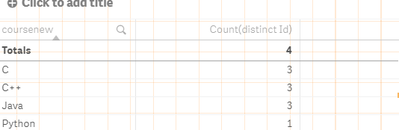
Subfield(Courses,'/') as chart dimension and count(distinct ID) as expression work
 durgesh22
- Mark as New
- Bookmark
- Subscribe
- Mute
- Subscribe to RSS Feed
- Permalink
- Report Inappropriate Content
Temp:
load * Inline
[
Name,Id,Course
A,1,C/C++/Java/Python
B,2,Nodejs/Python
C,3,Nodejs/Java/Python
];
Final:
load Name,Id,SubField(Course,'/') as SingleCourse resident Temp;
drop Table Temp;
Hope above code helps to solve you problem.
 sugathirajkumar
- Mark as New
- Bookmark
- Subscribe
- Mute
- Subscribe to RSS Feed
- Permalink
- Report Inappropriate Content
Tab2:
LOAD *
Inline [
Name , Id , Courses
sugan , 1234 , C/C++/Java/Python
raj , 1235 , C/C++/Java,
athira , 1236 , C/C++
lak , 1237 , Java
];
for i=1 to 4
Tab3:
LOAD *, SubField(Courses,'/',$(i)) as coursenew
Resident Tab2 ;
NEXT i;
drop table Tab2;
exit Script;